Your gaming PC gets hot.? Loud noise, low airflow, high CPU temps. This is where the best pc fans matter.
In 2026, modern PCs need strong airflow, low noise, and smart control. A bad fan can ruin gaming, streaming, or work. A good fan keeps your PC cool, smooth, and silent.
In this guide, we cover the best pc case fans 2026, RGB fans, silent fans, radiator fans, and budget picks. All fans listed are tested, trusted, and perfect for modern gaming PCs.
Our Top Picks: Best PC Fans for 2026
Finding the perfect fan shouldn't take hours of research. We've handpicked the best performers across different categories to match your specific needs.
be quiet! Light Wings 140 mm PWM Reverse Black
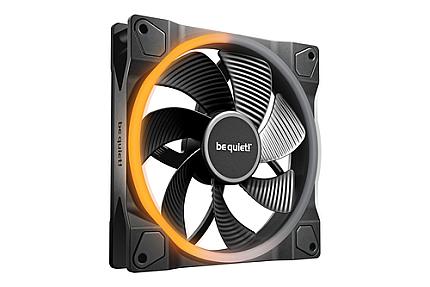
Size: 140mm
Color: Black
Speed Range: 1300 RPM
Light Wings 140mm PWM Reverse Black offers impressive illumination for a vibrant unique look, strong performance and quiet operation with efficient cooling.
If you are looking for a quiet case fan with an impressive look from every angle, Light Wings 140mm PWM Reverse Black is your fan of choice. Not only a visual highlight in any PC case when being used as a side or bottom intake, it’s also reliable and performant. This fan hits the sweet spot between performance, noise and ARGB lighting.
StarTech.com 90x25mm High Air Flow Dual Ball Bearing Computer Case Fan
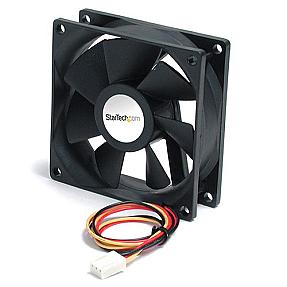
Color: Black
Bearing Type: Dual Ball Bearing
This compact powerhouse proves that good things come in small packages. The dual ball bearing design ensures years of reliable operation, even in demanding 24/7 scenarios. The 90mm size fits perfectly in tight spaces where standard 120mm fans won't work.
Ideal for mini-ITX builds or adding extra airflow to cramped areas around your GPU or drives.
Corsair iCUE QL120
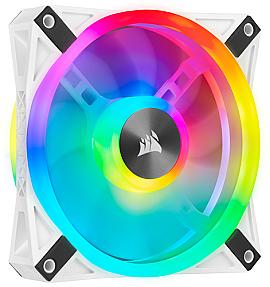
Size: 120mm
Speed Range: 525-1500 RPM
Color: White
The QL120 redefines what RGB fans can do. With dual-sided lighting, it creates stunning visual effects whether used as intake or exhaust. The white finish looks clean and modern, matching perfectly with white-themed builds.
The speed range offers excellent flexibility. Run them slow and silent during light tasks, or ramp up when gaming demands better cooling. This is Best gaming 120mm case fan.
ASUS TUF GAMING TR120 ARGB 1-pack
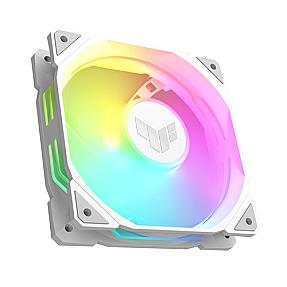
Type: Air Cooler
Color: White
Lighting: ARGB
Built to match ASUS TUF motherboards, this fan combines military-grade durability with smooth ARGB lighting. 120mm ARGB fan white blades and frame create a premium aesthetic that stands out in any build.
The TUF branding means this fan can handle whatever you throw at it. Gaming marathons, rendering sessions, or constant uptime won't phase it.
Corsair Air CO-9051002-WW
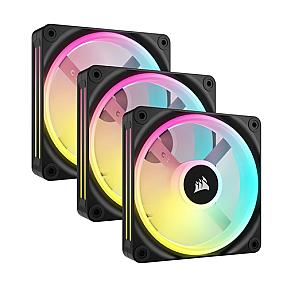
Size: 120mm
Speed Range: 480-2400 RPM
Color: Black
When you need raw performance, this Corsair offering delivers. The massive 2400 RPM maximum speed pushes serious air through your case. Yet it can drop down to whisper-quiet 480 RPM when you're just browsing or watching videos.
Great for radiator mounting or as exhaust fans in high-performance gaming rigs.
Corsair iCUE LINK LX120 RGB
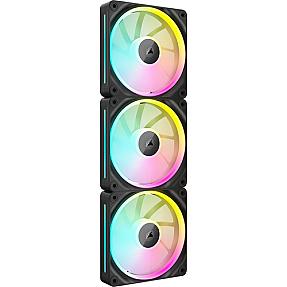
Size: 120mm
Speed Range: 400-2400 RPM
Color: Black
The iCUE LINK system simplifies cable management dramatically. Daisy-chain multiple fans with a single connection instead of running separate cables for each one. The RGB effects sync perfectly across your entire Corsair ecosystem.
The 400 RPM minimum means truly silent operation during idle times.
NZXT RF-U24HF-W1
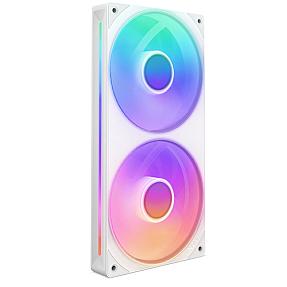
Speed Range: 500-2400 RPM
Color: White
NZXT builds fans that balance performance and aesthetics beautifully. This white fan pushes excellent airflow while maintaining NZXT's signature clean look. The speed range handles everything from silent computing to aggressive cooling.
Matches perfectly with NZXT cases and other white-themed components.
Best PC Fan to Buy for Cool Gaming PC Case Fan 2026
Your gaming rig sounds like a jet engine ready for takeoff. Your GPU hits scary temps during intense sessions. Your CPU throttles just when you need max performance. Sound familiar?
You're not alone. Most PC builders underestimate how crucial proper airflow is until their expensive components start cooking. The good news? The right best PC fans can solve this nightmare without breaking the bank.
Modern PC case fans do more than just spin. They manage heat, reduce noise, and some even light up your setup with stunning RGB effects. But with hundreds of options flooding the market in 2026, choosing the right fans feels overwhelming.
Comparison Table: Top PC Fans at a Glance
| Product | Size | Speed Range | Lighting | Best For | Price Range |
|---|---|---|---|---|---|
| Corsair iCUE QL120 | 120mm | 525-1500 RPM | RGB | Aesthetics & Performance | Premium |
| Corsair iCUE LINK LX120 | 120mm | 400-2400 RPM | RGB | Easy Installation | Premium |
| ASUS TUF TR120 ARGB | 120mm | Variable | ARGB | White Builds | Mid-Range |
| Corsair Air CO-9051002-WW | 120mm | 480-2400 RPM | None | Pure Performance | Mid-Range |
| StarTech 90x25mm | 90mm | High Flow | None | SFF Builds | Budget |
| NZXT RF-U24HF-W1 | 120mm | 500-2400 RPM | None | Quiet Cooling | Mid-Range |
Understanding PC Case Fan Basics
Before diving into specific recommendations, let's cover the fundamentals that separate good fans from great ones.
What Makes a Great PC Fan
A quality case fan balances three critical elements: airflow, noise levels, and durability. Airflow determines how much hot air gets pushed out and cool air pulled in. Noise levels affect your overall computing experience. Durability ensures your investment lasts through years of continuous operation.
Modern fans use advanced bearing technologies like fluid dynamic bearings or magnetic levitation. These reduce friction, extending lifespan while minimizing sound. PWM fans offer intelligent speed control, ramping up during intense gaming sessions and quieting down during light tasks.
Static pressure matters too. High static pressure fans excel at pushing air through obstacles like radiators and dense heatsinks. High airflow fans work best as intake and exhaust in unrestricted positions.
Fan Sizes Explained: 120mm vs 140mm
The eternal debate between 120mm and 140mm fans comes down to your specific case and needs. Both sizes have distinct advantages.
120mm fans fit virtually every PC case on the market. They're the industry standard, offering the widest selection of models, price points, and features. Their compact size makes them ideal for radiator mounting and tight spaces.
140mm fans move more air at lower speeds, resulting in quieter operation for equivalent cooling. Their larger surface area creates better airflow efficiency. However, not all cases support 140mm mounting points, and they typically cost more than 120mm alternatives.
For most gaming builds, 120mm fans provide the perfect balance of compatibility, performance, and value. They're easier to find, more affordable, and deliver excellent results when properly configured.
Best Case Fans for Radiator and CPU Cooling
Radiator fans need pressure.
Case fans need airflow.
Radiator Fans
-
High static pressure
-
Push air through fins
-
Best for liquid cooling
CPU Cooler Fans
-
Balanced airflow
-
Low vibration
-
Silent at low speed
Choose fans based on use case.
Best PC Case Fans for Maximum Airflow
High airflow is crucial for gaming PCs that generate significant heat from powerful GPUs and CPUs.
The Corsair Air CO-9051002-WW stands out as an airflow champion. Its wide speed range from 480 to 2400 RPM lets you dial in exactly the cooling performance you need. The dual ball bearing construction ensures years of reliable service even under demanding conditions.
For budget-conscious builders, the Arctic P12 Max series delivers exceptional value. These fans punch well above their price point with impressive CFM ratings. Arctic fans have built a reputation for reliability and quiet operation despite their affordable pricing.
When configuring airflow, remember the golden rule: slightly positive pressure works best. This means more intake fans than exhaust fans. Positive pressure prevents dust accumulation by ensuring air only enters through filtered intakes.
Optimizing Airflow in Your Case
Fan placement dramatically impacts cooling performance. Front and bottom fans should intake cool air. Top and rear fans should exhaust hot air. This creates a natural convection current that efficiently removes heat.
Three fans minimum works for most builds: two front intake, one rear exhaust. High-end gaming systems benefit from five or more fans, adding top exhaust and bottom intake for comprehensive cooling coverage.
Don't forget about fan curves. Configure your PWM fans through BIOS or software to respond intelligently to temperature changes. This maximizes cooling when needed while maintaining quiet operation during light use.
Silent Wings 4 and Quiet Cooling Solutions
Silence matters just as much as cooling for many users. Nobody wants a jet engine roaring during late-night gaming sessions.
The be quiet. Silent Wings 4 represents the pinnacle of quiet cooling technology. These premium fans combine advanced aerodynamic design with noise-dampening features. Even at high speeds, they maintain remarkably low noise levels.
Silent Wings 4 fans use fluid dynamic bearings that virtually eliminate friction noise. The fan blades feature optimized geometry that reduces turbulence. Rubber mounting pads isolate vibration, preventing case resonance.
For the best quiet cooling setup, run larger 140mm fans at lower speeds rather than smaller 120mm fans at higher speeds. The physics works in your favor moving the same air volume with larger blades at slower rotation creates less noise.
Finding the Balance Between Cooling and Noise
Modern PWM fans let you customize the performance-to-noise ratio. Create custom fan curves that prioritize silence during desktop work and ramp up cooling during gaming.
Most systems only need maximum speed during intense gaming or rendering. During normal use, fans running at 30-50% speed provide adequate cooling with minimal noise.
Quality fans matter for quiet operation. Cheap fans develop bearing noise, blade rattle, and motor hum over time. Investing in reputable brands like Noctua, be quiet!, or Corsair pays dividends in long-term quiet performance.
RGB PC Fans: Style Meets Performance
RGB lighting has become a staple of modern PC building, letting you customize your setup's appearance.
The Corsair iCUE QL120 RGB stands as our top pick for RGB enthusiasts. With 32 individually addressable LEDs, these fans create stunning lighting effects visible from any angle. The iCUE software provides extensive customization, syncing with other Corsair components for cohesive lighting schemes.
ARGB fans offer more flexibility than standard RGB. They allow individual LED control, creating flowing rainbow effects, reactive lighting, and complex patterns. The ASUS TUF GAMING TR120 ARGB delivers beautiful lighting at a more accessible price point.
Don't sacrifice cooling for looks. The best RGB PC fans combine eye-catching aesthetics with genuine performance. Check airflow specs and noise ratings alongside lighting features.
Managing RGB Fan Cables and Controllers
RGB setups can become cable nightmares without proper planning. The ARGB & Fan Controller Hub simplifies this chaos, providing centralized control for multiple fans.
The revolutionary Corsair iCUE LINK fans eliminate traditional RGB cables entirely. They daisy-chain together, requiring just a single connection for several fans. This dramatically simplifies installation and cable management.
Plan your RGB ecosystem before purchasing. Mixing incompatible RGB standards (3-pin ARGB vs 4-pin RGB) creates headaches. Stick with one manufacturer's ecosystem for seamless integration and unified software control.
Best Budget PC Fans That Don't Compromise
Quality cooling doesn't require breaking the bank. Several excellent budget options deliver reliable performance.
Arctic fans consistently top value charts. The Arctic P12 series offers remarkable airflow and build quality at incredibly low prices. These fans use fluid dynamic bearings and optimize blade design for efficient cooling.
Budget doesn't mean loud. Modern affordable fans run quieter than premium options from just a few years ago. Focus on reputable brands with good warranty coverage rather than no-name alternatives.
When building on a budget, prioritize fan placement over quantity. Three well-positioned quality fans outperform five poorly placed cheap fans. Get the basics right first, then expand your cooling as budget allows.
Where to Save and Where to Spend
Exhaust fans can be budget models since they face less restriction. Save money here. Intake fans behind dust filters benefit from higher static pressure, warranting slightly better models.
RGB fans cost significantly more than non-RGB equivalents. If lighting isn't essential, redirect that budget toward higher-quality non-RGB fans or additional case fans.
Consider fan bundles. Multi-packs often provide better value than individual fans. Many manufacturers offer 3-pack or 5-pack options at reduced per-fan pricing.
Best Radiator Fans for Liquid Cooling
Liquid cooling systems demand fans optimized for static pressure rather than pure airflow.
Radiator fans push air through dense fin arrays, requiring strong static pressure capability. Standard high airflow fans struggle with this resistance, resulting in poor cooling performance.
The best radiator fans balance static pressure with reasonable airflow. They maintain cooling efficiency while pushing through radiator resistance. Look for fans specifically marketed for radiator use or with high static pressure ratings.
Thick radiators need fans with even higher static pressure. If you're running a 60mm radiator instead of standard 30mm thickness, prioritize fans with maximum static pressure specs.
Push, Pull, or Push-Pull Configuration
Push configuration mounts fans on the intake side, pushing air through the radiator. This setup works well and simplifies installation.
Pull configuration places fans on the exhaust side, pulling air through the radiator. This can improve aesthetics by hiding fans behind the radiator.
Push-pull uses fans on both sides, maximizing cooling performance. Two fans working together overcome radiator restriction more effectively. This configuration works best for overclocked systems or thick radiators but doubles fan costs.
Best CPU Coolers and Compatible Fans
While not strictly case fans, CPU cooler fans deserve mention since they're integral to overall cooling.
CPU coolers come with bundled fans, but upgrading to premium options can improve both cooling and acoustics. Noctua fans represent the gold standard for CPU cooler upgrades.
The best CPU fans balance static pressure and airflow. They need enough pressure to push air through heatsink fins while maintaining good airflow for heat dissipation.
Many modern CPU coolers support 120mm or 140mm fans. Upgrading to a quality 140mm fan can drop temperatures while reducing noise compared to the stock 120mm option.
Matching Fans to Your Cooler
Tower coolers benefit from high static pressure fans that efficiently push air through vertical fin arrays. The narrow gaps between fins create resistance requiring capable fans.
Low-profile coolers use smaller fans that spin faster. Upgrading these fans rarely helps since size limitations constrain performance more than fan quality.
AIO liquid coolers use radiator fans. Apply the same radiator fan principles: prioritize static pressure and consider push-pull for maximum performance.
Gaming PC Fan Setup Guide
Setting up fans correctly transforms cooling performance from mediocre to excellent.
Start with your case's fan mounting points. Identify front, top, bottom, and rear positions. Not all cases support every position, so work with what you have.
Install at least two intake fans in the front or bottom. These draw cool air into the case. Install at least one exhaust fan in the rear or top. This creates directional airflow that sweeps heat away from components.
RGB case fans look spectacular but plan the wiring carefully. Use RGB hubs or controllers to avoid overwhelming your motherboard's RGB headers.
Advanced Fan Configuration Tips
GPU sag brackets can block bottom intake fans. Verify clearance before installing bottom fans in your PC case.
Consider fan filters for all intakes. Positive pressure setups work best with filtered intakes, keeping dust out while maintaining airflow.
Cable management affects airflow. Route cables neatly behind the motherboard tray. Messy cables create turbulence and obstruct cooling airflow.
PWM Fans vs DC Fans: What's the Difference
Understanding fan control methods helps you choose compatible components and optimize cooling.
PWM fans use a 4-pin connector and pulse width modulation for speed control. The motherboard varies the electrical pulse width to adjust fan speed precisely. This provides smooth, granular control from minimum to maximum RPM.
DC fans use a 3-pin connector and voltage variation for speed control. Reducing voltage slows the fan. This method works but offers less precise control and may cause fans to stall at very low speeds.
PWM fans represent the modern standard. They respond better to temperature changes, maintain stable operation at low speeds, and integrate seamlessly with motherboard fan control.
Choosing the Right Fan Control Method
Modern motherboards support both PWM and DC fans, but PWM provides superior control. If building a new system, choose PWM fans exclusively.
Some RGB controllers only support DC fans. Check compatibility before purchasing to avoid control issues.
Fan splitters and hubs maintain PWM functionality. You can run multiple PWM fans from a single header using quality splitters without losing speed control.
Best PC Case Fans 2026 - What's New
The cooling market continues evolving with exciting innovations for 2026.
Magnetic levitation bearings have become more common in premium fans. They eliminate physical contact between moving parts, drastically extending lifespan and reducing noise.
Daisy-chain connectivity like Corsair's iCUE LINK simplifies installation. No more RGB cable nightmares or complex hub setups. Connect fans in series for clean, easy builds.
AI-powered fan control integrates with modern motherboards and software. Systems learn your usage patterns and optimize cooling curves automatically, balancing performance and acoustics intelligently.
Future-Proofing Your Cooling Setup
Modular fan ecosystems let you expand gradually. Start with a few quality fans and add more as needs or budget allow.
Standard mounting holes haven't changed in decades. Fans you buy today will fit cases for years to come. This makes investing in quality fans a smart long-term decision.
Software support matters for RGB PC fans. Choose manufacturers with established software ecosystems and regular updates. This ensures compatibility with future components and features.
Common PC Fan Mistakes to Avoid
Even experienced builders make fan-related mistakes that hurt cooling performance.
Installing all fans as exhaust creates negative pressure. This sucks dust through every case gap and crack. Always maintain neutral or slightly positive pressure with more intake than exhaust.
Blocking intake fans with hard drives, cables, or other components wastes cooling potential. Ensure clear paths for air to flow into and through your case.
Ignoring fan orientation sounds basic but happens surprisingly often. Fans have directional arrows showing airflow and rotation direction. Double-check before mounting.
Maintenance and Longevity Tips
Dust accumulation kills cooling performance. Clean fan blades and filters every 3-6 months depending on your environment.
Quality fans last 5-10 years with proper care. Cheap fans fail within 1-2 years. The upfront cost difference becomes negligible over time.
Monitor fan speeds through BIOS or software. Sudden speed changes or failures often indicate bearing problems. Replace failing fans before they stop completely and cause overheating.
What PC fans are best?
The best PC fans depend on your priorities. For overall performance, Noctua NF-A12x25 PWM fans excel with exceptional airflow, low noise, and legendary reliability. For RGB aesthetics, Corsair iCUE QL120 or LINK LX120 fans offer stunning lighting with solid cooling. Budget builders should consider Arctic P12 Max fans for outstanding value.
Silent Wings 4 fans lead for quiet operation. Choose based on your specific needs cooling performance, noise levels, RGB lighting, or budget constraints.
Are 140mm or 120mm fans better?
140mm fans move more air at lower speeds, making them quieter for equivalent cooling. They're more efficient but cost more and require case support. 120mm fans fit more cases, offer wider selection, and typically cost less.
For most gaming PCs, 120mm fans provide better value and flexibility. Use 140mm fans if your case supports them and quiet operation is a priority. Both sizes perform excellently when properly configured.
What is the strongest PC fan?
The strongest PC fans in terms of raw airflow include the Corsair Air series reaching 2400 RPM and industrial Noctua fans delivering over 160 CFM. The Arctic P12 Max offers exceptional airflow at lower prices.
However, "strongest" doesn't always mean "best" high-speed fans often produce significant noise. For radiators, prioritize static pressure over pure airflow. The most effective cooling comes from proper fan configuration rather than simply choosing the highest CFM rating.
Which CPU fan is best?
For CPU cooling, Noctua fans remain the gold standard with models like the NF-A12x25 and NF-A15. Be quiet! Silent Wings 4 fans excel for quiet operation. Arctic P12 and P14 PWM PST fans offer excellent budget alternatives.
The best CPU fan matches your cooler type tower coolers need high static pressure, while AIO radiators benefit from radiator-optimized fans. Many CPU coolers include quality fans, but upgrading to premium options can reduce noise and improve cooling by several degrees.
Conclusion
Choosing the best PC fans transforms your gaming experience from thermal throttling and excessive noise to cool, quiet, and consistent performance. The right cooling setup protects your expensive components while creating an enjoyable computing environment.
We've covered everything from high-airflow champions and whisper-quiet Silent Wings to stunning RGB options and budget-friendly alternatives. Whether you're building your first gaming PC or upgrading an existing system, these recommendations provide a solid foundation for excellent cooling.
Remember the key principles: maintain positive air pressure, prioritize quality over quantity, match fans to their specific role (airflow vs static pressure), and don't neglect regular maintenance. Your PC will thank you with years of reliable, cool operation.
Ready to upgrade your cooling? Start with our top picks, configure your fan setup properly, and enjoy the perfect balance of performance, acoustics, and aesthetics in your 2026 gaming build.
Comments (128)