The Rise of Customizable Machine Vision
In today’s automation-driven world, machine vision systems have become essential for industries like manufacturing, logistics, robotics, and quality inspection. These systems aren’t just about cameras and algorithms—they rely heavily on powerful computing platforms designed to handle real-time data processing, high-speed connectivity, and integration with external devices.
But here’s the key question: Can these machine vision systems be customized to fit your specific needs?
The answer is yes. Modern machine vision solutions, like those offered by Pondesk, allow customization of RAM, storage, and operating systems so that businesses can tailor performance and cost according to their unique requirements. Whether you’re running AI-driven defect detection, 3D object recognition, or real-time robotics guidance, customization ensures your investment is optimized.

What Truly Makes a Machine Vision System Flexible?
A truly flexible machine vision system is designed to adapt to a wide range of industrial automation needs. Instead of locking you into fixed specifications, it provides customizable hardware options such as scalable DDR4 RAM, expandable storage with both SATA and NVMe drives, and the choice of operating systems like Windows or Ubuntu. This level of customization ensures seamless performance across different use cases, from simple barcode inspections to advanced AI machine vision tasks such as real-time defect detection, robotics guidance, and 3D object recognition. By investing in a flexible solution, businesses gain long-term scalability, cost efficiency, and the power to keep pace with evolving automation demands.
What we pondesk is offers:
-
DIMM DDR4 Memory (RAM): Scale from 8GB up to 64GB depending on workload intensity.
-
Operating System & Firewall: Choose Windows 10 Pro, Windows 10 Home, or Ubuntu Desktop Edition based on your ecosystem.
-
Storage 1 (2.5" SATA SSD/HDD): Options from 128GB SSD up to 2TB SSD for bulk data logging.
-
Storage 2 (M.2 NVMe SSD): High-speed storage for AI and vision workloads, expandable from 128GB NVMe up to 2TB NVMe.
- Wireless Connectivity: 802.11 b/g/n Wi-Fi, 802.11 ax Wi-Fi (2.4 Gbps) and 4G WWAN (up to 150 Mbps)
This flexibility ensures you only pay for what you need today, while keeping room to scale tomorrow.
Machine Vision Systems – Tech Spotlight
When it comes to AI-driven factories, robotics, and advanced automation, not all machine vision systems are created equal. The right system depends on your workload, scalability goals, and budget. Below, I’ve highlighted six standout solutions — each tailored for different needs, yet all customizable with memory, storage, and OS options to fit your unique use case.
The AI Powerhouse You Need
“Engineered for deep learning, robotics, and future-ready factories.”
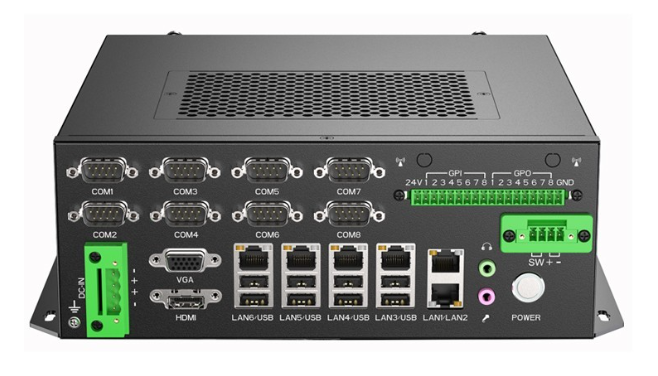
If your goal is serious AI workloads and multi-camera inspections, Intel® Core i7-9700 Machine Vision System is the system to trust. The i7-9700 processor delivers raw speed and efficiency, while the 16 opto-isolated DIO ports make it perfect for integrating into complex industrial environments. With support for up to 64GB DDR4 RAM and dual storage flexibility (SATA SSD/HDD + NVMe SSD), it’s a future-proof platform that ensures smooth real-time analytics.
In my opinion, this is the system you choose if you want a long-term automation backbone. Whether it’s defect detection in automotive assembly or AI-assisted robotics in electronics, the i7-9700 provides performance you won’t outgrow anytime soon.
-
Specs: Intel Core i7-9700 | 6× LAN, 6× COM, 8× USB | 16 Opto-isolated DIO | Wi-Fi
Best For: AI-driven defect detection, 3D vision, robotics, deep learning.
Customization Options:
-
Technical spec limit: 64 GB DDR4 supported.
-
Customization option on Pondesk: Up to 32 GB DDR4 is offered at checkout.
-
Wireless Connectivity: 802.11 b/g/n Wi-Fi, 802.11 ax Wi-Fi (2.4 Gbps) and 4G WWAN (up to 150 Mbps)
-
Operating System: Windows 10,11 Pro / Home and Ubuntu
-
Storage 1: 128GB → 2TB SATA SSD/HDD
-
Storage 2: 128GB → 2TB NVMe SSD
My Take: This is the flagship system for heavy-duty machine vision. Perfect for factories with multi-camera setups, real-time object recognition, or AI-assisted inspections. With dual storage customization, it can handle both long-term data logging (SATA SSD) and high-speed processing (NVMe). If you want the most future-proof solution, this is it.
Performance Without Breaking the Bank
“Reliable performance without breaking the budget.”
For businesses looking to balance performance with affordability, the Intel® Core i5-9500 Machine Vision System is the natural choice. It offers the same robust connectivity as the i7 version — 6 LAN ports, 6 COM ports, 8 USB ports, and 16 DIO channels — but with a more accessible price point. That makes it ideal for warehouses, logistics hubs, and food & beverage plants that need dependable machine vision without overspending.
Personally, I see this as the sweet spot for mid-sized operations. It delivers enough power for barcode scanning, packaging verification, and defect inspection while leaving room for customization as workloads grow.
-
Specs: Intel Core i5-9500 | 6× LAN, 6× COM, 8× USB | 16 Opto-isolated DIO | Wi-Fi
Best For: Quality inspection, barcode scanning, logistics automation.
Customization Options:
- Wireless Connectivity: 802.11 b/g/n Wi-Fi, 802.11 ax Wi-Fi (2.4 Gbps) and 4G WWAN (up to 150 Mbps)
-
Memory: 8GB → 64GB DIMM DDR4
-
OS: Windows 10,11 Pro / Home and Ubuntu
-
Storage 1: 128GB → 2TB SATA SSD/HDD
-
Storage 2: 128GB → 2TB NVMe SSD
My Take: The i5-9500 strikes the sweet spot between power and affordability. It’s perfect for logistics hubs or manufacturers needing reliable quality checks without overspending. If you want strong multi-tasking and plenty of ports for connecting industrial cameras, this is my top recommendation.
Entry-Level Excellence for Smart Automation
“Affordable automation for startups and small factories.”
Not every business needs the raw power of an i7 — and that’s where the Intel® Core i3-9100 Machine Vision System shines. Designed as an entry-level solution, it’s affordable yet rugged, making it perfect for startups or smaller production lines beginning their automation journey. With 16 opto-isolated DIO ports and customizable storage up to 2TB, it’s more capable than most would expect at this tier.
I would recommend this model to companies testing pilot projects or automating basic inspection tasks such as labeling or single-camera barcode systems. It’s the smart way to step into machine vision without overinvesting.
-
Specs: Intel Core i3-9100 | 6× LAN, 6× COM, 8× USB | 16 Opto-isolated DIO | Wi-Fi
Best For: Small-scale automation, labeling, barcode inspection.
Customization Options:
-
Memory: 8GB → 64GB DDR4
-
Operating System: Windows 10,11 Pro / Home and Ubuntu
-
Storage 1: 128GB → 2TB SATA SSD/HDD
-
Storage 2: 128GB → 2TB NVMe SSD
My Take: This is the ideal entry point for small factories or startups. Affordable yet rugged, it provides a future upgrade path with storage and RAM expansion. If you’re new to machine vision and want a budget-friendly system that won’t lock you in, this is the way to go.
Expansion Ready for GPU Acceleration
“Built for GPU acceleration and multi-camera AI applications.”
For industries planning GPU-accelerated AI applications, Intel® Core i7-9700 PCIe Machine Vision System model is a powerhouse. The dual PCIe slots provide the flexibility to add graphics cards for deep learning, making it suitable for real-time 3D inspection, high-speed defect detection, and robotics integration. Combined with 6 LAN ports and customizable storage, it’s a solution built to grow with your needs.
This is the system I’d place in automotive factories, electronics manufacturing, or advanced security monitoring setups. If scalability and AI performance are your top priorities, you can’t go wrong here.
-
Specs: Intel Core i7-9700 | 6× LAN, 4× COM, 8× USB | 2× PCIe | Wi-Fi
Best For: GPU-accelerated deep learning, multi-camera inspection.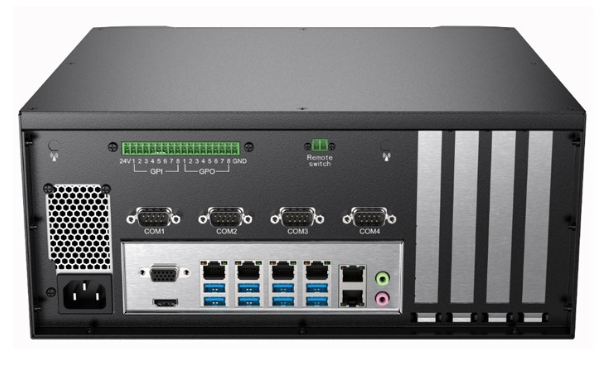
Customization Options:
-
Memory: 8GB → 64GB DDR4
-
Operating System: Windows 10,11 Pro / Home and Ubuntu
-
Storage 1: 128GB → 2TB SATA SSD/HDD
-
Storage 2: 128GB → 2TB NVMe SSD
My Take: This system shines with its PCIe expandability, making it perfect for AI and GPU-driven tasks. If you’re working on complex neural networks, facial recognition, or robotics guidance, this is the machine I’d choose. It’s an investment in scalability, built to grow with your projects.
The Reliable All-Rounder for Growing Operations
“A trusted workhorse with upgrade flexibility.”
The Intel® Core i5-9600 PCIe Machine Vision System model strikes a perfect balance for growing operations. It’s strong enough for multi-camera inspections while giving you the flexibility to upgrade later with PCIe expansions. That makes it especially valuable for factories scaling from pilot projects to larger automation systems.
If I had to recommend a system for businesses in transition, this would be it. It’s powerful, adaptable, and cost-effective — the kind of workhorse that won’t let you down even as workloads intensify.
-
Specs: Intel Core i5-9600 | 6× LAN, 4× COM, 8× USB | 2× PCIe | Wi-Fi
Best For: Standard industrial vision workloads with room to scale.
Customization Options:
-
Memory: 8GB → 64GB DDR4
-
Operating System: Windows 10 Pro / Home / Ubuntu
-
Storage 1: 128GB → 2TB SATA SSD/HDD
-
Storage 2: 128GB → 2TB NVMe SSD
My Take: Think of this as the workhorse of PCIe-based vision systems. It has the muscle for most industrial needs, plus PCIe slots for future GPU upgrades. If you’re a factory moving from basic inspection to advanced automation, this is the ideal transitional system.
Smart & Affordable Start with PCIe Flexibility
“Cost-effective PCIe flexibility for growing businesses.”
Finally, for those who need entry-level affordability with expansion flexibility, the Intel® Core i3-9100 PCIe Machine Vision System is the best fit. It provides all the essentials for basic automation — 6 LAN, 4 COM, 8 USB — while leaving room for GPU upgrades via PCIe slots. That means you can start small today and scale tomorrow.
I’d suggest this option for small factories, R&D labs, and startups that want a future-ready yet budget-conscious system. It’s an affordable stepping stone into serious machine vision.
-
Specs: Intel Core i3-9100 | 6× LAN, 4× COM, 8× USB | 2× PCIe | Wi-Fi
Best For: Entry-level setups with room to grow.
Customization Options:
-
Memory: 8GB → 64GB DDR4
-
Operating System: Windows 10 Pro / Home / Ubuntu
-
Storage 1: 128GB → 2TB SATA SSD/HDD
-
Storage 2: 128GB → 2TB NVMe SSD
My Take: This is the budget-friendly PCIe option. For small-scale deployments, it provides all the customization flexibility of higher-end models, without the upfront cost. Perfect for startups or pilot projects that may expand later with GPUs and additional storage.
Final Thoughts – Customization as the Competitive Edge
Machine vision is transforming industries—but no two applications are identical. With customizable RAM, storage, and OS, Pondesk machine vision systems give you complete control over performance and cost.
From the AI powerhouse i7 models to budget-friendly i3 systems, Pondesk ensures you can start small, scale fast, and stay future-proof. In my opinion, that’s the smartest way to invest in machine vision: customize today, expand tomorrow.
FAQs About Customizable Machine Vision Systems
1.Why should I customize a machine vision system?
Customizing a machine vision system ensures that you only pay for the performance you need while keeping room to scale as your workload grows. For example, a startup might begin with entry-level RAM and storage, then upgrade later when processing larger datasets or integrating multi-camera setups. This flexibility helps businesses optimize cost, improve efficiency, and stay future-proof.
2.Which CPU is best for AI-driven machine vision tasks?
For AI-heavy tasks like deep learning, 3D object recognition, or GPU-accelerated robotics, Intel® Core i7 processors are the top choice. They provide high processing speeds, multiple cores, and seamless multitasking capabilities that are crucial for real-time analytics. Entry-level Intel® Core i3 or mid-range i5 processors, however, are excellent for small to medium-scale automation, barcode inspection, and logistics operations.
3.What industries benefit most from customizable machine vision?
Customizable machine vision is valuable in industries like manufacturing, automotive, logistics, food and beverage, electronics, and security monitoring. Whether it’s defect detection in assembly lines, automated packaging verification, or robotics guidance, different industries benefit from tailoring RAM, storage, and operating systems to their specific needs.
4.Is it possible to upgrade machine vision systems later?
Yes, most customizable systems are designed with scalability in mind. You can expand RAM, increase storage (SATA or NVMe), or even add GPUs via PCIe slots depending on the model. This ensures your system adapts to future workloads without requiring a complete replacement.
5.How much storage do I need for machine vision applications?
The storage requirement depends on the type of application. For basic inspection or labeling tasks, a 128GB to 256GB SSD is usually sufficient. However, for applications involving AI training, real-time video analytics, or large-scale defect detection, you may need up to 2TB NVMe storage to handle high-speed data processing and logging.
6.What operating system works best with machine vision?
Both Windows and Ubuntu are widely used for machine vision. Windows 10 Pro or Home is preferred for industrial setups with commercial software compatibility, while Ubuntu is ideal for AI developers and open-source environments. The choice depends on your existing ecosystem and project requirements.


Comments (0)