Why Vehicles Need Rugged Computing
In today’s fast-paced world, vehicles are no longer just about transportation—they’re becoming mobile hubs of data, communication, and decision-making. From logistics fleets and emergency response vehicles to public transport and defense applications, the demand for powerful, durable, and reliable in-vehicle computers is greater than ever.
Ordinary PCs or consumer laptops simply can’t survive the vibrations, shocks, dust, and temperature fluctuations on the road. That’s where rugged in-vehicle computers come in. Designed with industrial-grade durability, advanced connectivity, and multi-purpose flexibility, they ensure that critical systems keep running no matter the conditions.

What Defines an In-Vehicle Rugged Computer?
From foundation to function, these computers distinguish themselves in several critical ways:
-
Built for Harsh Environments
Rugged computers are engineered to endure strong vibrations, wide temperature ranges (–40°C to +70°C or more), dust, moisture, and electromagnetic interference, combining rugged casing with internal thermal design and industrial components. -
Vehicle-Specific Requirements
In-vehicle systems add features like wide voltage input compatibility, ignition sensing, and vehicle-grade I/O (CAN bus, GPS, cellular, Wi-Fi), all ruggedized for mobile use. -
Certified for Durability
Many models comply with standards such as MIL-STD-810, IP ratings, and railway certifications like EN 50155, ensuring tested resilience in real field conditions.
Key Benefits of In-Vehicle Rugged Computers
-
24/7 Reliability & Durability
Designed for continuous use, these devices tolerate bumps, shocks, and extreme climates without succumbing to failure. -
Lower Total Cost of Ownership (TCO)
Rugged systems may cost more up-front, but fail less often and reduce downtime, delivering a 33–36% lower TCO compared to regular systems. -
Real-Time Data for Smarter Operations
With integrated connectivity and processing, fleets gain real-time visibility—tracking routes, optimizing operations, and responding proactively. -
Enhanced Wireless and I/O Connectivity
Features like dual-diversity Wi-Fi antennas, external antennas, and a range of wired I/O ensure reliable communication in steel cabins and congested environments.
Rugged In-Vehicle Computers: Personal Recommendations & Tech Spotlight
Selecting the right in-vehicle rugged computer defines the efficiency, safety, and success of mobile operations. Pondesk offers a range of powerful, field-ready solutions tailored for every level of need.
The Command Center for Mission-Critical Vehicles
If you want the top-tier performer, Intel® Core i7-8565U Rugged In-Vehicle Computer is the rugged PC you choose. With its i7 processor and wealth of I/O options, it’s built for heavy-duty operations like AI-assisted video analytics, smart surveillance in police cars, and military-grade applications. Personally, I see this model as a “future-proof investment” — the kind of system you won’t need to upgrade for years because it has the raw power to handle evolving workloads.
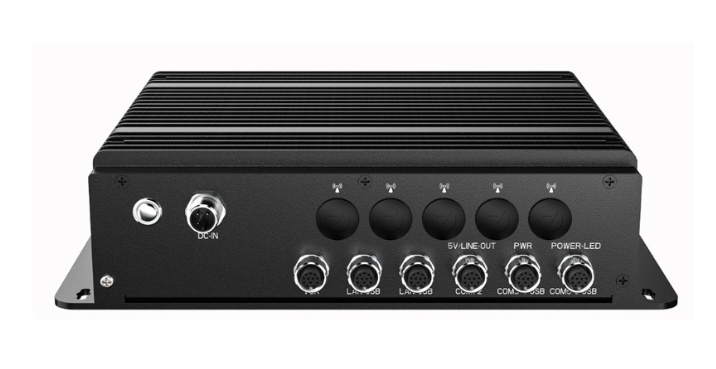
For fleet operators and government agencies, the combination of 6 COM ports and 8 USB ports makes it incredibly versatile. You can hook up everything from GPS and dash cameras to biometric scanners and sensor hubs, all without running into connectivity bottlenecks. This is the computer I’d recommend if you want a mission-critical, all-in-one solution that simply won’t quit.
-
Specs: Quad-Core i7-8565U | 4×LAN, 6×COM, 8×USB | Wi-Fi, 4G, WWAN
-
Why choose it: Perfect for high-performance needs like AI video analytics, autonomous systems, or military-grade applications. Rich I/O means no adapters—straightforward integration with sensors, cameras, and comms systems.
-
Personal take: A future-proof workhorse—invest once, and it’s ready for next-gen software your fleet will demand.
The Fleet Manager’s Smart Choice
For most businesses, Intel® Core i5-8265U Rugged In-Vehicle Computer is the sweet spot. The i5-powered rugged computer strikes a balance between performance and cost-effectiveness. It has the same I/O richness as the i7 model but at a more accessible price point.
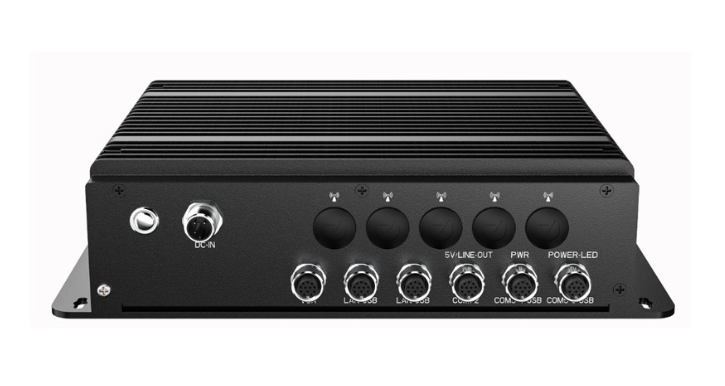
If you’re running public transportation systems, logistics fleets, or smart taxi networks, this computer makes perfect sense. It’s powerful enough for live GPS tracking, ticketing systems, passenger infotainment, and security camera streaming — all at once. Personally, I’d recommend this model for operators who need reliability on the road without overinvesting in raw CPU power they may never use. It’s my choice for scalable fleet deployments where dozens or hundreds of vehicles need rugged computers.
-
Specs: Quad-Core i5-8265U | Same I/O as the i7 model
-
Why choose it: Sweet spot for public transport, logistics, or fleet management applications needing robust computing without premium cost. Handles cameras, ticketing, navigation effortlessly.
-
Personal take: My go-to recommendation for scalable, dependable systems that won’t overextend the budget.
The Reliable Workhorse for Budget-Conscious Fleets
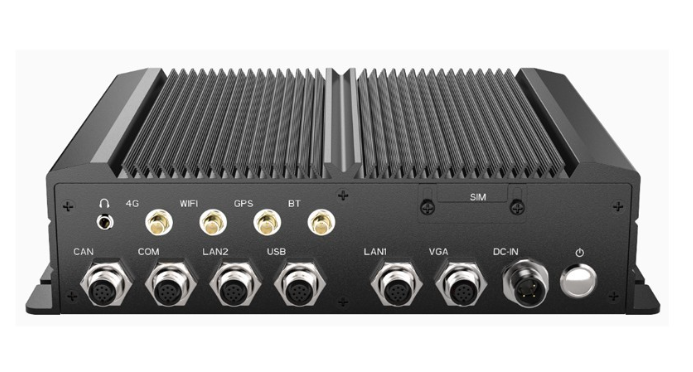
If budget is a major factor, the Intel® Celeron® J1900 Rugged In-Vehicle Computer (M12 I/O) proves that you don’t need to compromise on ruggedness to save on costs. This model is an excellent entry-level rugged computer for applications like basic fleet monitoring, environmental sensing, or light data collection in field vehicles.
It doesn’t pack the same raw horsepower as the i5 or i7 models, but not every deployment requires that level of performance. I’d personally recommend this one for smaller fleets, agricultural vehicles, or any setup where you just need stable, reliable computing without breaking the bank. Think of it as a practical workhorse — simple, efficient, and highly dependable.
-
Specs: Celeron J1900 | 2×LAN, 2×COM, 2×USB | Wi-Fi, 4G, WWAN
-
Why choose it: Entry-level but rock-solid—ideal for basic monitoring, environmental sensing, or agriculture fleets. Affordable yet rugged.
-
Personal take: Reliability where performance isn’t everything—this is your cost-efficient, dependable workhorse.
The Automation Specialist for Smart Mobility
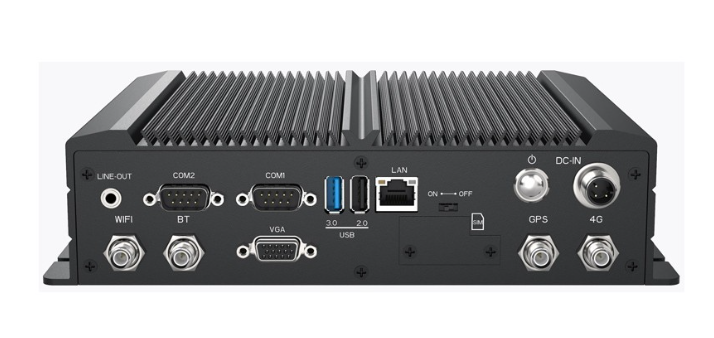
This model is for those who need integration with external signaling systems. With GPIO support, it becomes a natural fit for smart buses, security monitoring vehicles, industrial machinery, and transport systems where external triggers and alarms matter.
In my opinion, Intel® Celeron® J1900 Rugged In-Vehicle Computer (GPIO Model) shines in automation-heavy setups. Imagine a public bus where door sensors, passenger counters, and CCTV cameras all feed into one rugged computer — this is the machine for that. I recommend this for operators who want a cost-effective computer with advanced control capabilities, especially in smart city transport and industrial sectors.
-
Specs: Celeron J1900 | GbE LAN, 2×COM, 2×USB, GPIO | Wi-Fi, 4G, WWAN
-
Why choose it: Embraces industrial control possibilities—best for smart buses, security vehicles, or setups requiring sensor-triggered actions.
-
Personal take: The go-to for automation-heavy environments. Affordable, flexible, and smart, especially in smart-city or industrial transport contexts.
How to Align the Right Model with Your Use Case
|
Your Needs |
Recommended Pondesk Model |
|
Real-time analytics, heavy data load |
Intel® Core i7-8565U |
|
Balanced performance and cost |
Intel® Core i5-8265U |
|
Basic monitoring, low-cost setups |
Celeron® J1900 (M12 I/O) |
|
Automation, sensors, alarms control |
Celeron® J1900 (GPIO) |
Choosing the Right Rugged Companion for Your Fleet
From military convoys needing uninterrupted AI processing to logistics fleets optimizing every delivery route, rugged in-vehicle computers are the backbone of intelligent mobility. Pondesk’s lineup offers something for every operator—whether you need the cutting-edge performance of the i7, the balanced practicality of the i5, or the cost-conscious dependability of the Celeron models.
In my experience, investing in rugged computing isn’t just about buying hardware—it’s about buying peace of mind, operational efficiency, and the ability to adapt to the future of connected transport.
FAQs – In-Vehicle Rugged Computers
1. What is an in-vehicle rugged computer?
An in-vehicle rugged computer is a specialized computing system designed to operate in vehicles under extreme conditions such as vibration, dust, moisture, and wide temperature ranges. Unlike consumer laptops or desktops, they feature industrial-grade durability, vehicle-specific power management, and extended connectivity options.
2. Why are rugged computers better than regular PCs in vehicles?
Regular PCs are not designed for constant movement, heat, and vibration. Rugged computers include shock-proof builds, wide voltage input support, ignition control, and wireless communication (Wi-Fi, 4G, GPS, WWAN) that make them far more reliable. They also have a lower total cost of ownership since they fail less often and reduce downtime.
3. What industries use rugged in-vehicle computers?
They are widely used in:
-
Logistics & Fleet Management – for route optimization and real-time tracking.
-
Public Transportation – powering passenger information, ticketing, and CCTV systems.
-
Emergency Services – for live video streaming, mapping, and communication.
-
Defense & Security – mission-critical analytics, surveillance, and automation.
-
Agriculture & Mining – for equipment monitoring, automation, and safety controls.
4. What certifications should I look for in a rugged vehicle computer?
Look for MIL-STD-810 (military durability standard), IP ratings (water and dust resistance), and in some cases EN 50155 (railway certifications). These standards ensure the device has been tested for real-world shocks, temperature extremes, and environmental stress.
5. Are in-vehicle rugged computers expensive?
While the upfront cost is higher than standard PCs, rugged computers have longer lifespans, fewer breakdowns, and lower maintenance costs. Studies show they deliver a 33–36% lower total cost of ownership (TCO) compared to regular consumer devices in vehicle environments.
6. Which Pondesk rugged computer should I choose?
-
For AI, defense, or video-heavy analytics → Intel® Core i7-8565U Rugged In-Vehicle Computer
-
For balanced fleet operations → Intel® Core i5-8265U Rugged In-Vehicle Computer
-
For budget-friendly monitoring → Intel® Celeron® J1900 Rugged In-Vehicle Computer (M12 I/O)
-
For automation and sensor-driven tasks → Intel® Celeron® J1900 Rugged In-Vehicle Computer (GPIO Model)
7. How do rugged computers improve fleet safety?
By supporting GPS, surveillance cameras, biometric sensors, and emergency communication, rugged computers help fleets improve safety compliance, monitor driver behavior, and respond to emergencies in real time.
8. Can these systems connect to wireless networks anywhere?
Yes. Pondesk rugged computers support Wi-Fi, 4G, WWAN, and GPS, ensuring connectivity even in remote regions. Dual antenna setups also help reduce signal loss in steel cabins or congested areas.
9. How long do rugged computers typically last?
Rugged in-vehicle computers are designed for 5–7 years of consistent service under harsh conditions, often outlasting multiple vehicle cycles depending on usage.
10. Are rugged computers customizable?
Absolutely. Many models allow I/O expansion, GPIO integration, dual display outputs, and software customization, making them adaptable to unique operational requirements.


Comments (0)