When building or upgrading a system, most people put all their attention on GPUs, CPUs, or storage drives—but often forget the silent hero: the Power Supply Unit (PSU). In reality, your PSU is the heartbeat of your setup, deciding the stability, efficiency, and long-term health of every connected component.
In 2025, with powerful GPUs, gaming rigs, professional workstations, and enterprise servers demanding stable energy, choosing the right PSU has never been more critical. A mismatched or low-quality PSU can cause random shutdowns, system crashes, reduced lifespan of hardware, and even permanent damage.
Whether you are building a gaming PC, upgrading a creative workstation, or powering mission-critical servers and networking equipment, the right PSU ensures consistent power delivery, energy efficiency, and reliable performance. Simply put, your PSU is not just another part—it is the backbone of your entire system.
In this guide, we’ll help you choose the perfect PSU and highlight the best options from Pondesk’s collection.

What is a Power Supply Unit (PSU)?
A Power Supply Unit (PSU) is the heart of any computer or server. Its primary role is to convert AC power from your wall socket into stable DC power that components like your CPU, GPU, and storage devices can safely use.
Modern PSUs go beyond just providing power, they improve efficiency, offer modularity for better cable management, and include built-in protections against surges, overheating, and overload. In short, a PSU ensures that your system runs smoothly whether you’re gaming, creating content, or managing enterprise workloads.
Modular vs Non-Modular PSU — Which Should You Buy?
|
Feature |
Modular PSU |
Non-Modular PSU |
|
Cables |
Detachable, only use what you need |
Fixed, all cables permanently attached |
|
Cable Management |
Clean and easy |
Can be messy |
|
Airflow |
Better airflow due to fewer cables |
Restricted airflow in smaller cases |
|
Price |
More expensive |
More affordable |
|
Best For |
Gamers, enthusiasts, custom builds |
Budget builds, office PCs |
Recommendation: If you want clean airflow & upgrades → go modular. If you’re on a budget → non-modular works fine.
Pondesk Recommended PSUs
Here are some of the best PSUs available on Pondesk — tested, reliable, and built for every type of user.
🔹 Be Quiet Dark Power Pro 13 — 1300W PSU
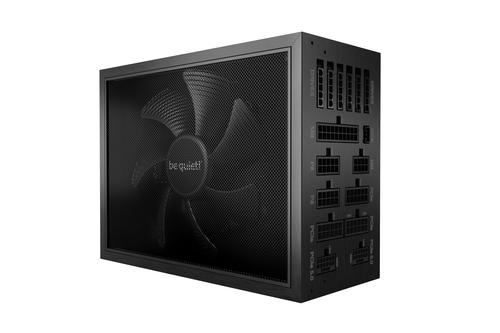
The Dark Power Pro 13 (1300W) is a fully modular PSU, built for extreme performance systems and overclocking.
What does Modular mean?
-
Modular PSUs allow you to attach only the cables you need.
-
This ensures better airflow, less clutter, and easier upgrades.
-
Use-Case: High-end gaming rigs, workstations, and overclocking setups.
Key Features:
-
1300W capacity, perfect for RTX 4090 & next-gen CPUs
-
Fully modular design for clean cable management
-
80 PLUS Titanium efficiency — maximum energy savings
-
Ultra-quiet operation with advanced cooling

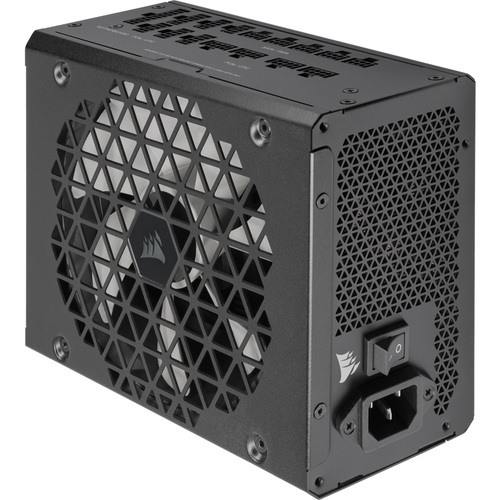
The Corsair RM1200x is a fully modular PSU designed for gamers and professionals needing stable power delivery.
What does Modular mean?
-
With modular PSUs, you connect only the required cables.
-
Results in cleaner builds, better airflow, and smoother upgrades.
-
Use-Case: Enthusiast gaming PCs and professional creators needing stable power for RTX 4090 or workstation GPUs
Key Features:
-
1200W reliable output for demanding GPUs & CPUs
-
Fully modular cabling for flexibility
-
80 PLUS Gold certified for energy efficiency
-
Quiet operation with zero RPM fan mode

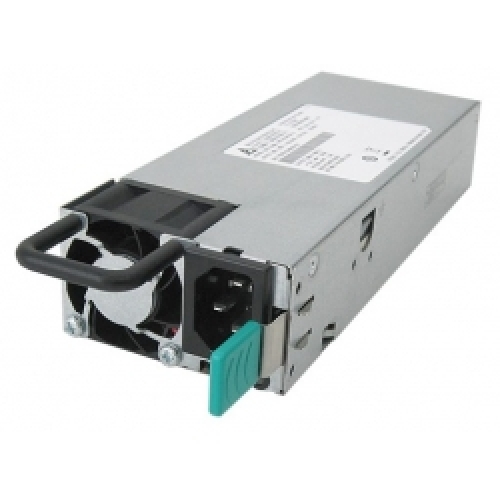
The QNAP SP-B01 (500W) is a non-modular PSU, delivering consistent performance for mid-level systems.
What does Non-Modular mean?
-
All cables are permanently attached, which can make cable management harder.
-
However, they are cost-effective and dependable for simpler systems.
- Use-Case: NAS (Network Attached Storage) systems and business servers.
Key Features:
-
500W capacity for standard setups
-
Non-modular build — plug and play
-
Reliable design with basic protections
-
Great value for everyday PCs

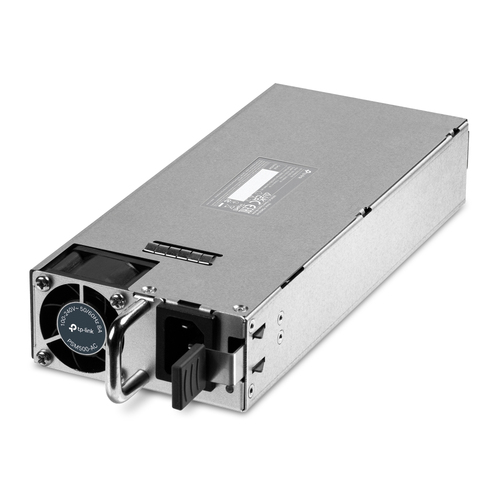
🔹 TP-Link PSM500 (500W) PSU
The TP-Link PSM500 (500W) is another non-modular PSU, designed for reliability and affordability.
What does Non-Modular mean?
-
Cables are fixed inside the unit, so you must manage extra wires in your case.
-
While not as neat as modular options, these PSUs are budget-friendly.
-
Use Case: It is designed for Servers and enterprise networking equipment.
Key Features:
-
500W reliable output for mid-level PCs
-
Non-modular cables for simple setups
-
Compact design with stable performance
-
Affordable option for users on a budget

✅ Key Things to Check Before Buying
-
Wattage Capacity → Match PSU wattage with GPU + CPU.
-
Efficiency Rating → Look for 80 PLUS Bronze, Gold, Titanium.
-
Form Factor → Ensure it fits your case (ATX, SFX).
-
Protection Features → OVP, OCP, SCP for safety.
-
Future-Proofing → Plan extra wattage for upgrades.
Final Thoughts
Your PSU is the foundation of performance and reliability. Whether you’re putting together a budget PC, a high-end gaming system, or an enterprise server, the right PSU ensures consistent power delivery, efficiency, and long-term durability.
Explore Pondesk’s PSU collection and find your perfect match today.
FAQs
1. How many watts do I need?
The PSU wattage depends on your components. For office and home PCs, 300–500W is enough. Gaming systems with RTX 4070/4080 need 650–850W, while high-end builds with RTX 4090 should aim for 1000W+. Always keep 100–150W extra for future upgrades.
2. Is a modular PSU worth the extra cost?
Yes, modular PSUs improve airflow and cable management since you only use the cables you need. This makes upgrades easier and systems cleaner. Non-modular options are cheaper but can lead to cable clutter.
3. Can I reuse my old PSU?
You can reuse it only if it’s relatively new, efficient, and supports modern connectors like PCIe 5.0/ATX 3.0. If it’s older than 5–6 years, replacement is recommended due to wear and efficiency loss.
4. Do higher efficiency ratings save money?
Yes. Higher-rated PSUs (Platinum/Titanium) waste less energy as heat, run cooler, and reduce electricity costs. For most users, 80 PLUS Gold is a great balance between price and efficiency.
Comments (3)