When setting up or upgrading your network, one important decision is whether to buy a Managed Switch or an Unmanaged Switch. Both devices connect multiple devices within your network, but the real difference lies in the level of control, customization, and management they provide.
In today’s digital world, networks are not just for large corporations—small businesses, startups, and even advanced home users rely on fast, stable, and secure connections. That’s where the choice between managed and unmanaged switches becomes critical.
A Managed Switch gives IT teams advanced features such as VLAN support, traffic monitoring, QoS (Quality of Service), and enhanced security—making them ideal for growing businesses and enterprise setups. On the other hand, an Unmanaged Switch offers simplicity, affordability, and plug-and-play convenience, making it perfect for small offices, home networks, or setups where advanced control isn’t needed.
Understanding which switch fits your needs will not only save you money but also ensure your network runs smoothly, efficiently, and securely for years to come.

Managed vs Unmanaged Switch
What is a Managed Switch?
A Managed Switch gives full control over your network traffic. You can configure VLANs, monitor performance, set Quality of Service (QoS) rules, and apply security measures to protect sensitive data. Managed switches are also remotely manageable, meaning IT teams can monitor and troubleshoot without being physically present.
Use Cases:
-
Businesses & Enterprises: Need network segmentation (VLANs) to separate departments securely.
-
Servers & Data Centers: Require advanced monitoring and high-speed traffic control.
-
IP Cameras, VoIP & IoT Devices: PoE-enabled managed switches power and manage multiple devices efficiently.
-
Growing Networks: Scalable solution when you expect more devices/users in the future.
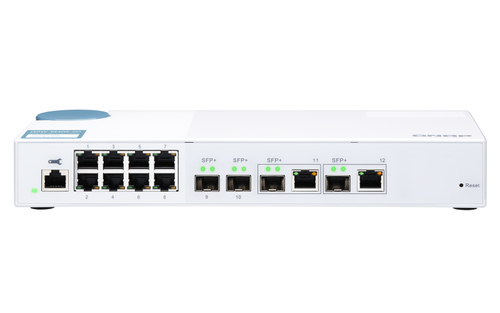
QNAP QSW-M408-2C L2 10G Ethernet Managed Switch
The QNAP QSW-M408-2C is a Layer 2 Managed Switch built for high-performance networks.
-
10G Ethernet connectivity for ultra-fast data transfers.
-
Supports VLANs, link aggregation, and traffic monitoring.
-
Best for offices, media editing teams, and enterprise workloads.

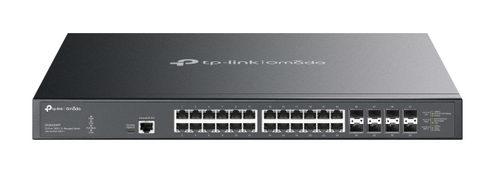
TP-Link Omada 32-Port 10GE 24-Port PoE L2 Managed Switch
The TP-Link Omada Managed Switch delivers enterprise-level power and control.
-
32 high-speed ports with 24 PoE support for powering cameras, APs, and phones.
-
Centralized Omada SDN integration for remote management.
-
Ideal for large businesses, campuses, and IT-driven environments.

What is an Unmanaged Switch?
An Unmanaged Switch is plug-and-play. It doesn’t offer monitoring or configuration, but it gets devices connected quickly and reliably. It’s designed for users who don’t need advanced features and just want network expansion at an affordable price.
Use Cases:
-
Homes & Small Offices: Easy expansion without IT knowledge.
-
Cafés, Shops, & Small Businesses: Perfect for POS systems, printers, and PCs.
-
Basic IP Camera Setups: PoE unmanaged switches provide simple powering solutions.
-
Budget-Friendly Networks: Low cost, no complexity.
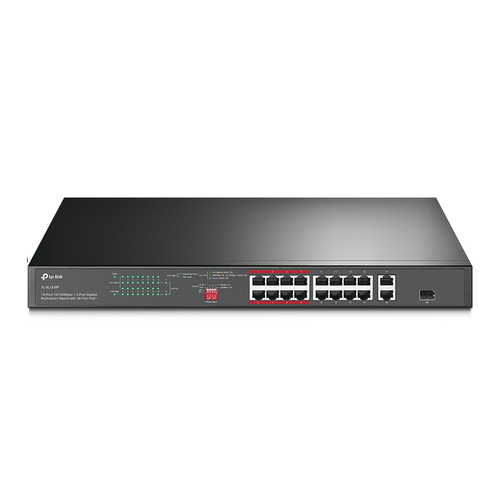
TP-Link 16-Port 10/100 Mbps + 2-Port Gigabit PoE Unmanaged Switch
The TP-Link 16-Port Unmanaged Switch is a simple, reliable choice for small setups.
-
16 Fast Ethernet ports + 2 Gigabit uplinks.
-
PoE support for powering devices directly.
-
Ideal for shops, small offices, and entry-level networks.

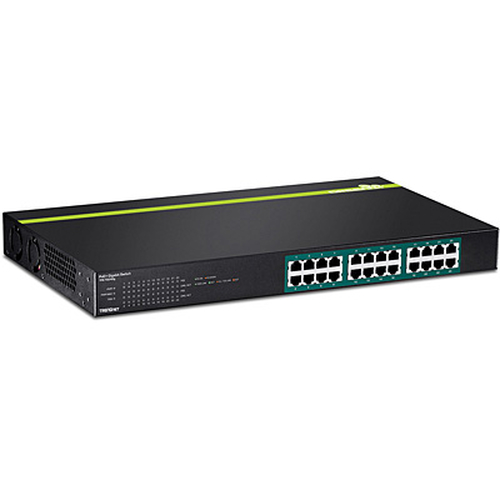
TRENDnet TPE-TG240G L2 Gigabit PoE Unmanaged Switch
The TRENDnet TPE-TG240G provides a bigger boost with 24 Gigabit ports.
-
PoE-enabled for IP cameras and phones.
-
No configuration required — just plug & use.
-
Perfect for SMEs, small IT setups, and budget networks.

Quick Overview: Managed vs Unmanaged Switches
|
Feature |
Managed Switch |
Unmanaged Switch |
|
Control |
Full configuration & monitoring (VLANs, QoS, security) |
None, plug-and-play |
|
Best For |
Businesses, enterprises, IT admins |
Homes, small offices, simple setups |
|
Scalability |
Highly scalable, supports growth |
Limited expansion |
|
Price |
More expensive |
Budget-friendly |
|
Ease of Use |
Requires IT knowledge |
Very easy, no setup needed |
Final Thoughts
If you value control, flexibility, and scalability, a Managed Switch is the way to go. However, if you prioritize simplicity, cost, and reliability, an Unmanaged Switch will serve you well.
Ready to choose? Explore Pondesk’s complete Switches Collection here:
All Network Switches on Pondesk
Frequently Asked Questions (FAQs)
1. What is the main difference between a managed and unmanaged switch?
A managed switch gives you full control over your network (VLANs, monitoring, security), while an unmanaged switch is plug-and-play with no configuration needed.
2. Who should buy a managed switch?
Businesses, IT teams, and enterprises that need reliability, traffic control, and secure data transfer should choose managed switches.
3. Is an unmanaged switch good for office use?
Yes, if your office is small and you don’t need advanced features, an unmanaged switch is cost-effective and easy to set up.
4. Do managed switches cost more than unmanaged?
Yes. Managed switches are more expensive because of advanced features and remote management capabilities, while unmanaged switches are cheaper and simpler.
5. Can I upgrade from unmanaged to managed later?
Yes, but it depends on your network growth. For small setups, unmanaged is fine. As your network expands, upgrading to managed ensures better scalability and security.
Comments (3)