Microsoft Surface Pro 7 UK
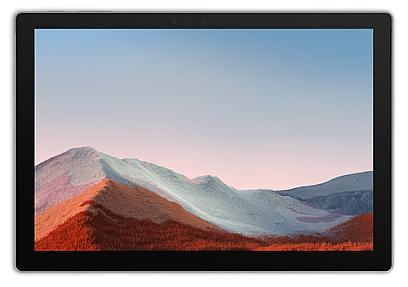
Product Code: TBEL-149
Microsoft Surface Pro 7+, 31.2 cm (12.3"), 1 TB, 16 GB, Windows 10 Pro, Pl...
Microsoft Surface Pro 7: Buying Guide (UK)
Looking for a Microsoft Surface Pro 7 in the UK and not sure which spec actually fits your day-to-day work? You're in the right spot. The Surface Pro 7 is still one of the most practical 2-in-1 devices going: light enough to carry everywhere, quick enough for real work, and priced well below a brand-new Surface Pro 9 or 10. This guide walks through what the specs mean in practice, who the Surface Pro 7 suits, and what to check before you buy, whether new, refurbished, or open-box.
What Is the Microsoft Surface Pro 7?
The Surface Pro 7 is Microsoft's 2019 tablet-laptop hybrid: a 12.3-inch touchscreen tablet that clips into a Type Cover keyboard and props itself up on a built-in kickstand. It runs full Windows 11 (not the limited "Go" version), so every desktop app you already use (Office, Chrome, Photoshop, Zoom) runs exactly as it would on a laptop. Configurations range from an entry Core i3 with 4GB RAM up to a Core i7 with 16GB RAM and 1TB storage, so the "right" Surface Pro 7 really depends on what you're doing with it day to day.
Key Specs That Actually Matter
Rather than list every spec, here's what changes your experience:
- Processor (i3 / i5 / i7): the i3 model is fine for email, browsing, and light document work, but struggles the moment you open several apps at once. The i5 is the sensible middle ground for most buyers: smooth multitasking, handles video calls and light photo editing comfortably. The i7 only makes sense if you're doing heavier creative work, like multi-layer Photoshop files or light video editing.
- RAM (4GB / 8GB / 16GB): avoid 4GB unless your use is genuinely minimal. 8GB is the practical baseline for anyone running Office plus a browser with a dozen tabs. 16GB is for creative or multitasking-heavy workloads.
- Storage (128GB–1TB SSD): storage is soldered in and can't be upgraded later, so buy for the long term. 128GB suits cloud-first users (OneDrive, Google Drive); 256GB is the safer general-purpose choice if you store files locally.
- Battery and ports: expect around 10 hours of real-world battery life, one USB-C, one USB-A, and no Thunderbolt support (that arrived with the Surface Pro 8).
Who the Surface Pro 7 Is Actually Good For
This is where the Surface Pro 7 earns its keep, honestly. Students get a genuinely portable device for lectures and libraries that doubles as a proper laptop for essays. Freelancers and consultants who work from cafés, client sites, or trains benefit from the tablet mode and low weight. Anyone who takes handwritten notes or sketches gets a natural pen-on-glass experience, though you'll need to buy the Surface Pen separately. It's less suited to gamers or anyone doing serious video rendering, since the integrated graphics cap out at light creative work.
New vs Refurbished vs Open-Box: What to Check
Buying refurbished is where most UK buyers get real value on a five-year-old device. Before buying, check:
- Battery health: a refurbisher should state a minimum battery health percentage (85%+ is a reasonable bar).
- Cosmetic grading: sellers usually grade devices A/B/C or similar, so know what "light wear" actually looks like before you commit.
- What's included: the Type Cover keyboard and Surface Pen are almost always sold separately, even on new units, so factor that into your budget.
- Warranty length: 12 months is the UK standard for reputable refurbished sellers, and anything shorter is worth questioning.
Surface Pro 7 vs Surface Pro 8: Is It Worth Paying More?
If you're weighing a Surface Pro 7 against the newer Pro 8, the differences come down to Thunderbolt 4 support, a slightly larger 13-inch display with thinner bezels, and a higher refresh rate screen. These are useful upgrades, but not essential for everyday productivity. For most buyers doing office work, browsing, note-taking, and video calls, the Surface Pro 7 delivers nearly the same day-to-day experience for meaningfully less money. The Pro 8 only earns its premium if you specifically need Thunderbolt peripherals or heavier creative performance.
Why Buy Your Surface Pro 7 From PonDesk
PonDesk sources Surface Pro 7 units through verified, industry channels and prices them competitively against the wider UK market, so you're not paying over the odds for a five-year-old device. Every order ships with free UK delivery, and our team can talk you through which spec actually fits your workload before you buy, no guesswork, no upselling you into a config you don't need.
Common Questions About the Surface Pro 7
Is the Surface Pro 7 still worth buying in 2026?
Yes, for everyday productivity, browsing, note-taking, and video calls. It runs the current version of Windows 11 without issue. It's not the choice for gaming or heavy video editing, where a newer or dedicated-GPU device will serve you better.
Does the Surface Pro 7 come with the keyboard and pen?
No. The Type Cover keyboard and Surface Pen are sold separately from the tablet itself, on both new and refurbished listings, so check the listing carefully before you buy.
Can I upgrade the RAM or storage later?
No. RAM and storage are soldered to the board on the Surface Pro 7, so choose your configuration based on what you'll need over the device's full lifespan, not just today.
What's the difference between the Surface Pro 7 and Surface Pro 7 Plus?
The Surface Pro 7 Plus is a business-focused refresh with 11th-gen Intel processors, a removable SSD, and optional LTE. The standard Surface Pro 7 uses 10th-gen processors and covers general consumer and student use just as well for most day-to-day tasks.
Quick Answer
Which Surface Pro 7 spec should I buy? For most people, an Intel Core i5 with 8GB RAM and 256GB storage covers everyday work comfortably. Go i7/16GB only for creative workloads, and remember the keyboard and pen are sold separately.
Browse PonDesk's current Surface Pro 7 stock to compare specs and grades, or get in touch if you'd like help picking the right configuration for your budget.