If your business needs a reliable desktop for CAD, 3D design, engineering, video editing, rendering, or AI workloads, the Lenovo ThinkStation P3 Tower Gen 2 workstation offers a strong balance of performance, expandability, and professional reliability.
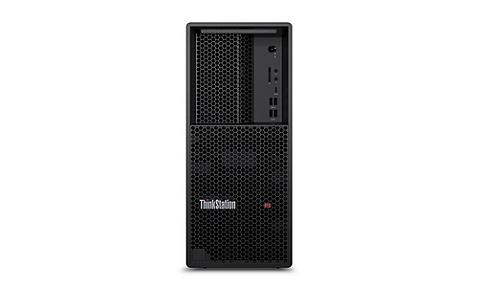
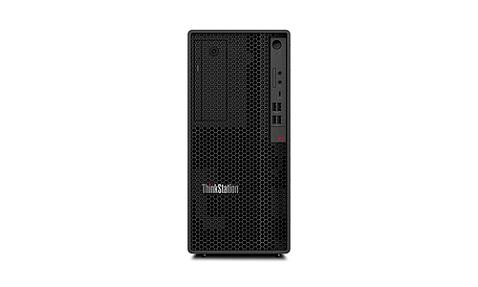
Built around Intel Core Ultra Series 2 processors and professional NVIDIA graphics, the ThinkStation P3 Tower Gen 2 gives businesses the processing power needed for demanding applications. Its tower design also provides more room for memory, storage, graphics cards, and future upgrades than compact workstation systems.
PonDesk offers multiple Lenovo ThinkStation P3 Tower Gen 2 workstation configurations, including Core Ultra 7 and Core Ultra 9 systems with up to 64GB RAM and 1TB SSD storage. You can choose a configuration based on your software, workload, and business requirements.
What Is the Lenovo ThinkStation P3 Tower Gen 2 Workstation?
The Lenovo ThinkStation P3 Tower Gen 2 workstation is a professional desktop designed for engineers, designers, architects, content creators, developers, and other users who need more performance and reliability than a standard business PC can provide.
The second-generation P3 Tower moves to Intel's Core Ultra Series 2 platform and adds an integrated NPU for AI-related workloads. It also supports professional NVIDIA graphics, giving users the GPU performance required for CAD, 3D visualization, rendering, simulation, and other graphics-intensive applications.
The 23-liter tower chassis gives the P3 Tower Gen 2 useful expansion space while keeping the system smaller than many high-end workstation towers.
Key features include:
-
Intel Core Ultra 5, Core Ultra 7, or Core Ultra 9 processors
-
Intel Core Ultra Series 2 platform
-
Integrated NPU for supported AI workloads
-
Professional NVIDIA graphics options
-
Up to 256GB DDR5 memory depending on configuration
-
Fast NVMe SSD storage
-
Support for multiple internal drives
-
PCIe expansion slots
-
Power supply options designed for different GPU configurations
-
Professional workstation design
-
ThinkShield security features
-
Tool-less access for easier maintenance and upgrades
This combination makes the P3 Tower Gen 2 suitable for businesses that need a workstation they can deploy today and upgrade as their workloads grow.
Lenovo ThinkStation P3 Tower Gen 2 Workstation Performance
Workstation performance depends heavily on the processor, GPU, RAM, storage, and software you select.
For many professional users, the biggest advantage of the Lenovo ThinkStation P3 Tower Gen 2 workstation comes from combining a powerful Core Ultra processor with a professional NVIDIA GPU and enough RAM for the workload.
The Core Ultra platform provides strong CPU performance for applications that depend on fast processor speeds. The NVIDIA professional graphics options handle GPU-intensive workloads such as 3D modeling, visualization, rendering, and AI acceleration.
The system also includes an NPU designed for supported AI tasks. This can help accelerate compatible workloads without relying entirely on the CPU.
For B2B buyers, this matters because workstation performance should match the software your employees use every day. A higher-end configuration can make more sense when employees spend hours working with large CAD assemblies, complex 3D scenes, simulations, or high-resolution media.
Choosing the Right P3 Tower Gen 2 Configuration
PonDesk offers different Lenovo ThinkStation P3 Tower Gen 2 workstation configurations. Your choice should depend on the applications you run rather than simply choosing the highest specification.
Core Ultra 7 with 16GB RAM and 512GB SSD
This configuration can work well as an entry-level professional workstation.
It suits users who need more capability than a standard office desktop but do not regularly work with very large projects.
Typical applications include:
-
General CAD
-
Engineering software
-
Technical documentation
-
Light 3D work
-
Business applications
-
Web-based workloads
-
General multitasking
However, 16GB RAM can become restrictive when you run several demanding applications at the same time.
Core Ultra 7 with 64GB RAM and 1TB SSD
For many professional users, this configuration provides a better balance.
The additional RAM gives you more room for large projects and multitasking. The 1TB SSD also provides more practical space for applications, project files, and working data.
This configuration makes sense for users working with:
-
Larger CAD assemblies
-
Engineering applications
-
3D design
-
Moderate rendering
-
Photo and video editing
-
Multiple professional applications
Core Ultra 9 with 64GB RAM and 1TB SSD
The Core Ultra 9 configuration targets more demanding professional workloads.
If your team regularly performs rendering, video encoding, complex engineering calculations, or AI-related tasks, the additional CPU performance can be valuable.
It is a stronger choice for businesses where workstation performance directly affects productivity and project turnaround time.
How Much RAM Do You Need?
RAM plays an important role when buying a Lenovo ThinkStation P3 Tower Gen 2 workstation.
A simple way to approach the decision is:
-
16GB: Suitable for lighter professional workloads
-
32GB: A good starting point for many CAD and engineering users
-
64GB: Better for larger projects, rendering, multitasking, and demanding professional applications
-
128GB+: Worth considering for very large datasets, complex simulations, advanced rendering, and memory-intensive workflows
For a business workstation, 64GB can be a sensible choice if your users regularly work across several demanding applications.
For example, an engineer may have a CAD application, browser tabs, PDF documents, collaboration software, and analysis tools open at the same time. More RAM helps the system handle that workload without relying as heavily on slower storage.
Lenovo ThinkStation P3 Tower Gen 2 for CAD and Engineering
CAD and engineering professionals need more than a fast processor.
They also need stable graphics performance, reliable drivers, sufficient memory, and a workstation designed for professional applications.
The Lenovo ThinkStation P3 Tower Gen 2 workstation is well suited to workloads involving applications such as AutoCAD, SolidWorks, Revit, and other professional design and engineering software.
A professional NVIDIA graphics card can also provide benefits for supported applications and 3D workflows.
For large assemblies and complex projects, consider prioritizing:
-
A powerful Core Ultra processor
-
Professional NVIDIA graphics
-
At least 32GB RAM
-
64GB RAM for heavier workloads
-
Fast NVMe storage
-
Additional storage if projects require large local datasets
Your ideal configuration will depend on the specific software your team uses.
P3 Tower Gen 2 for 3D Rendering and Visualization
3D artists, architects, designers, and visualization teams can benefit from the combination of CPU and professional GPU performance offered by the P3 Tower Gen 2.
GPU-accelerated applications can take advantage of NVIDIA professional graphics for supported rendering and visualization workloads.
This makes the workstation suitable for tasks such as:
-
3D modeling
-
Architectural visualization
-
Product visualization
-
Animation
-
GPU rendering
-
V-Ray workflows
-
Blender workflows
-
Technical visualization
If rendering represents a large part of your daily workload, prioritize the GPU rather than spending your entire budget on the CPU.
P3 Tower Gen 2 for Video Editing
The Lenovo ThinkStation P3 Tower Gen 2 workstation can also serve professional video editors and content production teams.
A powerful processor helps with encoding and other CPU-based tasks, while NVIDIA graphics can accelerate supported editing and rendering workloads.
Fast NVMe storage also helps when working with large media files.
For video editing, consider a configuration with:
-
Core Ultra 7 or Core Ultra 9 processor
-
64GB RAM for demanding workflows
-
1TB or larger SSD for active projects
-
Professional NVIDIA graphics
-
Additional storage for media libraries and project archives
If your team regularly works with high-resolution footage, storage capacity becomes especially important. You may want to use additional internal or external storage rather than keeping your entire media library on the primary SSD.
Lenovo ThinkStation P3 Tower Gen 2 for AI Workloads
AI is another area where the P3 Tower Gen 2 platform can provide useful hardware acceleration.
The Core Ultra platform includes an integrated NPU designed for supported AI workloads. The system can also use NVIDIA GPU acceleration for applications that support GPU-based AI processing.
For businesses exploring local AI tools, image generation, AI-assisted applications, or inference workloads, the combination of CPU, NPU, and professional GPU provides more flexibility than a conventional office desktop.
However, your GPU choice matters significantly for demanding AI workloads. If AI represents a major part of your business workflow, choose the graphics configuration based on the memory and acceleration requirements of your specific software.
Lenovo ThinkStation P3 Tower Gen 2 Expansion and Upgrade Options
One of the biggest reasons to choose a tower workstation is upgradeability.
The Lenovo ThinkStation P3 Tower Gen 2 workstation provides more internal expansion space than compact desktop systems. Depending on the configuration, the platform can support additional memory, storage, graphics, and PCIe expansion.
This gives businesses more flexibility as their requirements change.
You may start with a Core Ultra 7 system and upgrade storage or memory later. A suitable power supply configuration can also provide additional flexibility when moving to a more powerful graphics card.
For B2B buyers, this can extend the useful life of the workstation and reduce the need to replace complete systems every time project requirements increase.
Lenovo ThinkStation P3 Tower Gen 2 vs P2 Tower Gen 2
The P2 Tower Gen 2 and P3 Tower Gen 2 target similar professional users, but they serve different requirements.
The P3 Tower Gen 2 uses a larger 23-liter chassis, giving it more room for expansion and higher-performance graphics configurations.
The P2 Tower Gen 2 is a smaller tower that can make more sense when office space and budget matter more than maximum expansion.
Choose the P3 Tower Gen 2 if you need:
-
More expansion flexibility
-
Higher-performance professional graphics
-
Additional storage
-
More PCIe expansion
-
A workstation designed for demanding professional workloads
-
Better long-term upgrade potential
Choose the P2 Tower Gen 2 when you need a smaller professional desktop and your workload does not require the P3's additional expansion capability.
Is the Lenovo ThinkStation P3 Tower Gen 2 Worth Buying?
For businesses that run professional applications, the Lenovo ThinkStation P3 Tower Gen 2 workstation can be a strong investment.
It offers a combination of modern Intel processing, professional NVIDIA graphics, fast storage, expandable memory, and a tower design that gives you room to grow.
The key question is not whether the workstation is powerful. The more important question is whether your workload can use that performance.
If your employees mainly use email, Microsoft Office, browser-based applications, and basic business software, you may not need a professional workstation.
If they work with CAD, engineering, 3D modeling, rendering, video production, simulation, or AI workloads, a workstation can provide a more suitable platform.
Who Should Buy the P3 Tower Gen 2?
The Lenovo ThinkStation P3 Tower Gen 2 workstation is a good fit for businesses and professionals working in:
-
Engineering
-
Architecture
-
CAD design
-
3D modeling
-
Product design
-
Manufacturing
-
Construction
-
Video production
-
Media production
-
AI development
-
Data analysis
-
Technical visualization
It can also work well for organizations that want standardized professional workstations across a design or engineering team.
Who Does Not Need a P3 Tower Gen 2?
You probably do not need this level of workstation if your daily work only involves:
-
Email
-
Microsoft Office
-
Web browsing
-
CRM software
-
Accounting software
-
Basic content management
-
Video calls
-
Lightweight business applications
A standard business desktop can handle these tasks at a lower cost.
The P3 Tower Gen 2 makes more sense when professional applications create a genuine need for additional CPU, GPU, memory, and expansion capacity.
What is the Lenovo ThinkStation P3 Tower Gen 2 workstation used for?
The Lenovo ThinkStation P3 Tower Gen 2 workstation is designed for professional workloads such as CAD, engineering, 3D modeling, rendering, video editing, visualization, and supported AI applications.
Is the ThinkStation P3 Tower Gen 2 good for CAD?
Yes. Its combination of Intel Core Ultra processors, professional NVIDIA graphics options, expandable RAM, and workstation-oriented design makes it suitable for many CAD and engineering workloads.
How much RAM should I get for a P3 Tower Gen 2?
16GB can work for lighter workloads, but 32GB is a better starting point for many professional applications. For large CAD projects, rendering, multitasking, and other demanding workloads, 64GB provides more headroom.
Is Core Ultra 7 enough for a ThinkStation P3 Tower Gen 2?
For many CAD, design, engineering, and general professional workloads, Core Ultra 7 can provide more than enough performance. Core Ultra 9 makes more sense when your applications regularly use higher CPU performance for rendering, encoding, simulation, or other demanding tasks.
Can I upgrade the ThinkStation P3 Tower Gen 2 later?
The tower design provides meaningful upgrade potential for memory, storage, graphics, and PCIe expansion. The exact upgrade options depend on the selected configuration.
Is the ThinkStation P3 Tower Gen 2 good for video editing?
Yes. With an appropriate Core Ultra processor, sufficient RAM, professional NVIDIA graphics, and fast NVMe storage, it can handle demanding video editing and production workflows.
Is the P3 Tower Gen 2 good for AI?
It can be suitable for supported AI workloads. The Core Ultra platform includes an NPU, while compatible applications can use NVIDIA GPU acceleration. For demanding AI workloads, select the GPU based on the requirements of your specific applications.
Should I buy a P3 Tower Gen 2 or P2 Tower Gen 2?
Choose the P3 Tower Gen 2 if you need more expansion capacity, larger professional GPUs, additional storage, or better long-term upgrade flexibility. The P2 Tower Gen 2 can be a better option when you want a smaller professional workstation and have more modest expansion requirements.
Why Buy a Lenovo ThinkStation P3 Tower Gen 2 Workstation from PonDesk?
Choosing the right workstation is about more than comparing processor and RAM numbers.
You need a system that matches your software, workload, budget, and future requirements.
PonDesk offers Lenovo ThinkStation P3 Tower Gen 2 workstation configurations for professional and business users. Whether you need a Core Ultra 7 workstation for CAD or a higher-performance Core Ultra 9 system for rendering, video, engineering, or AI workloads, you can select a configuration based on your requirements.
Ready to upgrade your professional workstation? Explore the Lenovo ThinkStation P3 Tower Gen 2 range at PonDesk and choose the configuration that fits your business workload. Contact PonDesk for help selecting the right specification or request a bulk-order quote for your team.
Quick Summary
The Lenovo ThinkStation P3 Tower Gen 2 workstation is a professional tower designed for businesses that need reliable performance for demanding workloads.
Its key advantages include:
-
Intel Core Ultra Series 2 processors
-
Integrated NPU for supported AI workloads
-
Professional NVIDIA graphics
-
Expandable memory and storage
-
Fast NVMe storage
-
Multiple expansion options
-
Tower design for easier upgrades
-
Professional workstation reliability
-
Configurations for different business workloads
For CAD, engineering, 3D rendering, video editing, visualization, and AI-assisted work, the P3 Tower Gen 2 gives you the flexibility to build a workstation around the applications your business depends on.
Comments (0)