Apple MacBook Air M1 2020
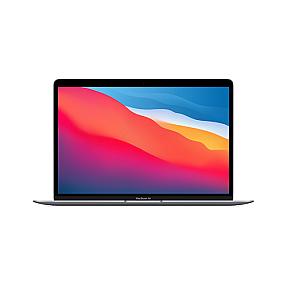
Product Code: LTHO-2015
Apple MacBook Air 2020 13.3in M1, 8GB/256GB macOS Big Sur - Space Grey MGN...
If you're shopping for a laptop that handles everything without slowing you down, the MacBook Air M1 2020 is hard to beat. At Pondesk.com, this Apple laptop is listed for business buyers, students, and resellers in UAE, USA, and Europe who want real value and long-term use.
If you are looking for a fast, light, and reliable laptop, the macbook air m1 2020 is still one of the smartest choices you can make today.
Apple MacBook Air M1 2020 - Business Deals
The Apple MacBook Air M1 2020 is a premium lightweight laptop built for daily business, study, and travel use. It uses the Apple M1 chip, which is a major upgrade over old Intel-based models. You get faster speed, better battery life, and silent performance because there is no fan noise.
This macbook air 13.3 inch model is perfect for people who need a reliable laptop for Zoom calls, office work, browsing, and light creative tasks. The Space Gray design also gives a clean professional look for business users.
Pondesk offers the MacBook Air M1 2020 for B2B buyers, resellers, and volume purchasers. Buy 5 or more units and unlock priority discounts. Buy 20 or more units and get exclusive volume pricing. Email [email protected] or click Request a Quote.
Apple MacBook Air M1 2020 Overview and Key Features
The MacBook Air M1 2020 is a 13.3-inch laptop built on Apple's first in-house chip. It came out in late 2020 and completely changed what people expected from a thin laptop. Before this, most thin laptops either ran hot or slowed down under pressure. The M1 MacBook Air does neither. It has no fan, so it never gets loud. It runs cool, stays fast, and fits in any bag. For students and professionals who need a reliable daily machine, this is one of the best options at this price point.
Product reference: Apple MacBook Air 2020 13.3in M1, 8GB/256GB macOS Big Sur, Space Grey (MGN63B/A). Available in limited quantities. Request a quote for bulk orders.
Apple M1 Chip Performance and 8-Core CPU Power
The M1 chip is what makes this laptop different from every Intel-based laptop before it. Apple designed this chip from scratch, and it shows. The 8-core CPU splits into four performance cores for heavy tasks and four efficient cores for lighter work. This means the laptop decides how much power to use depending on what you're doing.
Running a spreadsheet? It uses less power. Exporting a video? It kicks up the performance cores. You get up to 3.5x faster CPU speed compared to the previous Intel models. The 8-core GPU handles graphics, and the 16-core Neural Engine powers machine learning tasks. Rosetta 2 also makes sure older Intel-based apps run without any issues.
RAM, SSD, Processor and Storage Options (8GB, 256GB SSD)
The base model comes with 8GB of unified memory and a 256GB SSD. Unlike traditional laptops where RAM and storage are separate, Apple's unified memory sits directly on the chip. This makes data transfer faster and overall performance smoother. The 256GB SSD is quick to load apps and saves files with no lag. If your workload is heavier, there are upgrade options up to 16GB RAM and 512GB or 1TB SSD. For most students and everyday business users, 8GB RAM and 256GB storage is enough to handle browsers, office apps, and communication tools all at once without slowing down.
| Spec | Details |
|---|---|
| RAM | 8GB Unified Memory |
| Storage | 256GB SSD |
| Processor | Apple M1 (8-core CPU) |
| GPU | 7-core GPU |
| Neural Engine | 16-core |
| Max RAM Option | 16GB |
| Max Storage Option |
1TB SSD |
MacBook Air 13.3" Retina Display and Brightness
The 13.3-inch Retina display on this macbook Air 13 runs at 2560 x 1600 HD resolution, which gives you 227 pixels per inch. Text looks sharp. Photos look accurate. Videos look clean. The IPS panel with True Tone technology adjusts the color temperature based on the lighting around you, so the screen never looks too warm or too cold.
Brightness goes up to 400 cd/m², which is comfortable for indoor use and bright enough for most office environments. At 13.3 inches, it's big enough to work comfortably but small enough to carry everywhere. There is no touchscreen, but the trackpad on this machine is one of the best you'll find on any laptop.
Mac M1 Battery Life, macOS and Everyday Laptop Use
The battery life on the MacBook Air M1 is genuinely impressive. Apple says up to 18 hours on a single charge. In real-world use with browsing, documents, and occasional video calls, most people get 12 to 15 hours easily. That means you can leave the charger at home for a full workday.
The laptop ships with macOS Big Sur and is fully compatible with macOS Ventura and later updates. The operating system is clean, well-organized, and easy to use even if you're coming from Windows. Apple Intelligence features are built in, which adds smart writing tools and improved Siri performance. For students and remote workers, the everyday experience feels fast and fluid.
Ports, USB-C, Wireless and Touch ID Features
This apple macbook air 13 comes with two usb-c ports (Thunderbolt 3 / Thunderbolt 4 support). You can connect fast storage, monitors, and charging through the same port.
Wireless is strong with wifi 6 and bluetooth 5.0, giving stable internet and device connection.
Other features include:
- Touch ID for secure login
- High-speed wireless performance
- Smooth trackpad control
- 1080p HD front camera
It is simple, clean, and built for modern work setups.
MacBook Air M1 2020 Price and Technical Specifications
The MacBook Air M1 2020 is priced competitively for what it offers. At Pondesk, B2B buyers get better pricing when ordering in volume. This is one of the best value laptops available in 2025 for business and education buyers. It holds up well against newer models like the M2 chip MacBook Air, especially at a lower price point.
| Specification | Details |
|---|---|
| Model | Apple MacBook Air 2020 (A2337) |
| Chip | Apple M1 |
| Display | 13.3-inch Retina, 2560x1600, IPS |
| RAM | 8GB Unified Memory |
| Storage | 256GB SSD |
| Battery | Up to 18 hours, 49.9 Wh |
| Ports | 2x Thunderbolt 3 / USB-C, 3.5mm audio |
| Wireless | Wi-Fi 6, Bluetooth 5.0 |
| OS | macOS Big Sur (upgradeable) |
| Weight | 1.29 kg |
| Color | Space Gray |
| MPN | MGN63B/A |
| Sustainability | EPEAT Gold, ENERGY STAR |
Is the MacBook Air with M1 chip good for video editing?
Yes, the MacBook Air M1 handles video editing well for most users. Final Cut Pro runs exceptionally smooth on M1, and Adobe Premiere Pro works fine too. For 4K timeline editing, color grading, and export, this machine punches above its price. Pondesk stocks the MacBook Air M1 2020 at competitive B2B pricing, great for creative teams buying in volume.
What are the best productivity applications for a portable computer with a custom processor?
On the MacBook Air M1, apps like Microsoft Office, Notion, Slack, Zoom, and Safari all run fast and stay battery-friendly. The M1 chip handles multitasking across these apps without slowdowns. If your team needs reliable productivity machines, Pondesk offers volume deals on MacBook Air M1 units for businesses and resellers.
Where can I buy the MacBook Air M1 model near me?
You can order the MacBook Air M1 2020 directly from Pondesk.com with shipping available across the Australia, UAE, USA, and Europe. Pondesk specializes in B2B laptop supply with volume discounts starting from 5 units. Email [email protected] for a custom quote.
How does the battery life of this fanless ultrabook compare to newer models?
The MacBook Air M1 lasts up to 18 hours on a single charge, which still beats many newer budget laptops in 2025. The M2 MacBook Air offers slightly better efficiency, but the M1 holds up well for full-day use. For the price, especially through Pondesk's volume deals, the M1 remains one of the best value options available.
What is the battery life of the MacBook Air M1 laptop?
Apple rates the MacBook Air M1 at 18 hours of battery life. In real daily use with browsing, documents, and video calls, most users get 12 to 15 hours. That's enough to skip the charger for a full workday. Pondesk sells this model with full specs verified and ready for bulk business orders.
Where can I find a durable hardshell case for this particular slender notebook?
The MacBook Air M1 2020 uses the same 13.3-inch chassis as the A2337 model, so any hardshell case labeled for MacBook Air 13-inch 2020 M1 fits perfectly. Brands like Mosiso, Inateck, and Speck make solid options. If you're ordering MacBook Air M1 units in bulk, Pondesk can help you source accessories alongside your laptops.
How does the MacBook Air M1 compare to other thin laptops?
The MacBook Air M1 is fanless, weighs just 1.29 kg, and still outperforms most Intel-based thin laptops in its class. It doesn't throttle under sustained load the way many slim Windows laptops do. For businesses comparing ultrabooks, the M1 MacBook Air offers better real-world performance per dollar, and Pondesk offers it at wholesale-friendly pricing for teams.
What is the typical resale value of a well-maintained unit of this generation's lightweight device?
A well-maintained MacBook Air M1 2020 holds its resale value better than most laptops in this category. In 2025 it still sells for a strong percentage of its original retail price because demand stays high. Businesses buying refurbished or grade-A units through Pondesk get reliable stock at prices that make resale margins realistic.
Which retailers offer discounts on the MacBook Air M1?
Pondesk.com offers some of the best B2B pricing on the MacBook Air M1 2020. Volume discounts start at 5 units, with exclusive pricing unlocked at 20 or more units. For resellers and corporate buyers across the UAE, USA, and Europe, Pondesk is a reliable source. Email [email protected] to get your custom quote today.
How to perform a clean operating system installation on a portable computer with this chip architecture?
To do a clean macOS install on the MacBook Air M1, restart the laptop and hold the power button until you see startup options. Select Options, open macOS Recovery, use Disk Utility to erase the drive, then reinstall macOS from the recovery menu. No USB drive needed. The M1 chip uses Apple Silicon recovery, which is different from older Intel-based Mac installs.