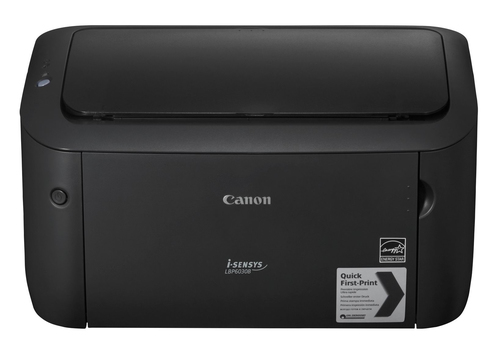
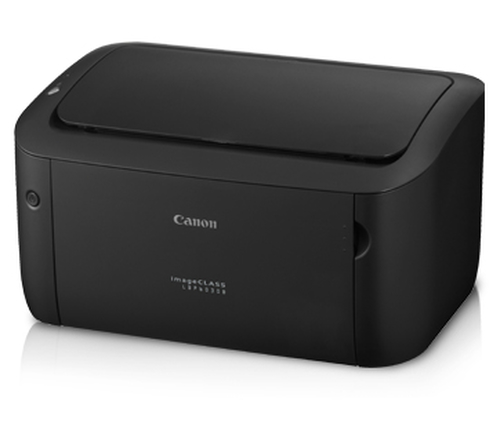
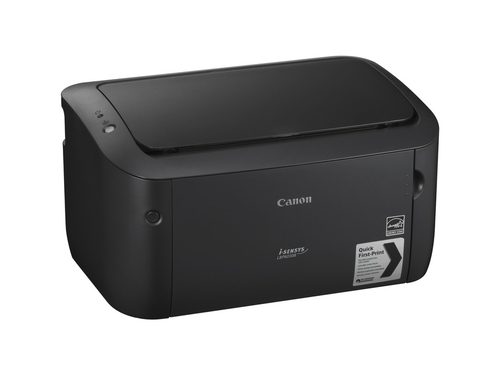
Tired of waiting for documents to print and watching your energy bill climb? The Canon LBP6030B (8468B023) 18ppm 2400x600dpi Monochrome Laser Printer delivers fast, crisp black-and-white pages while using very little power, making it ideal for a home office or small workspace where speed and efficiency matter.
You enjoy reliable, quiet operation that lets you focus on work without distraction, while the quick first-print time means you never miss a deadline. Low sleep-mode consumption reduces running costs, and the compact design frees up valuable desk space. The all-in-one cartridge simplifies maintenance, giving you peace of mind for long-term use.
Many buyers worry that a compact laser printer will be noisy or expensive to run. They also fear low print quality and frequent cartridge changes. With the Canon LBP6030B you get a quiet, energy-efficient machine that delivers professional-grade resolution and includes a recyclable all-in-one cartridge, so you replace the whole unit in seconds without mess. Its modest footprint and straightforward USB connection remove the complexity often associated with office equipment, giving you a reliable solution that fits neatly into any small-scale printing environment.
| Scanner |
| Scanner / Type | None |
| Miscellaneous |
| Miscellaneous / Color Category | Black |
| Miscellaneous / Consumables Included | 1 x toner cartridge (black) - up to 700 pages ISO/IEC 19752 - Canon 725 Starter |
| Dimensions & Weight |
| Dimensions & Weight / Height | 7.8in |
| Dimensions & Weight / Width | 14.3in |
| Dimensions & Weight / Depth | 9.8in |
| Dimensions & Weight / Weight | 11.02lbs |
| Printer |
| Printer / Connectivity Technology | Wired |
| Printer / Print Speed | Up to 18 ppm - B/W - A4 (8.25 in x 11.7 in) |
| Printer / Language Simulation | Canon Ultra Fast Rendering (UFRII LT) |
| Printer / Media Sizes | 3 in x 7.4 in |
| Printer / Max Resolution (B&W) | 2400 x 600 dpi |
| Printer / Type | Personal printer |
| Printer / Total Media Capacity | 150sheets |
| Printer / First Print Out Time B/W | 7.8 sec |
| Printer / Max H-Document Size | 8.5 in |
| Printer / Media Handling | 150-sheet multipurpose tray |
| Printer / Interface | USB 2.0 |
| Printer / Media Type | Heavy-weight paper |
| Office Machine |
| Office Machine / Printing Output Type | Monochrome |
| Office Machine / Monthly Duty Cycle Range (Printer Class) | 1,500 - 10,000 pages |
| Office Machine / Type | Printer |
| Office Machine / Monthly Duty Cycle (max) | 5000pages |
| Office Machine / Printing Technology | Laser |
| Office Machine / Functions | Printer |
| Media Handling |
| Media Handling / Max Media Size (Custom) | 8.5 in x 14 in |
| Media Handling / Media Weight | 60 g/m² - 163 g/m² |
| Media Handling / Media Sizes | Letter A Size (8.5 in x 11 in), Legal (8.5 in x 14 in), Executive (7.25 in x 10.5 in), A4 (8.25 in x 11.7 in), A5 (5.83 in x 8.25 in), B5 (6.93 in x 9.83 in), 3 in x 7.4 in |
| Media Handling / Media Type | Envelopes, transparencies, labels, plain paper, heavy-weight paper |
| Media Handling / Max Media Size | Legal (8.5 in x 14 in), A4 (8.25 in x 11.7 in) |
| Media Handling / Output Trays Capacity | 100 sheets |
| Media Handling / Media Size Class | A4/Legal |
| Media Handling / Media Feeders | 1 x automatic - 150 sheets - Legal (8.5 in x 14 in) weight: 60 g/m² - 163 g/m² |
| Media Handling / Min Media Size (Custom) | 3 in x 7.4 in |
| Media Handling / Total Media Capacity | 150 sheets |
| System Requirements |
| System Requirements / OS Required | Microsoft Windows Server 2012 R2 x64 Edition |
| Expansion / Connectivity |
| Expansion / Connectivity / Connections | 1 x USB 2.0 - 4 pin USB Type B |
| Printing |
| Printing / Max Resolution B/W | 2400 x 600 dpi |
| Printing / Max Printing Speed B/W (ppm) | 18ppm |
| Software / System Requirements |
| Software / System Requirements / OS Required | Linux, Apple MacOS X 10.6, Microsoft Windows Vista (32/64 bits), Microsoft Windows Server 2008 R2 x64 Edition, Microsoft Windows 7 (32/64 bits), Microsoft Windows XP (32/64 bits), Microsoft Windows Server 2008 (32/64-bits), Microsoft Windows Server 2003 (32/64-bits), Windows 8 (32/64 bits), Microsoft Windows Server 2012 (32/64-bits), Windows 8.1 (32/64 bits), Microsoft Windows Server 2012 R2 x64 Edition |
| Header |
| Header / Model | LBP6030B |
| Header / Product Line | Canon i-SENSYS |
| Header / Packaged Quantity | 1 |
| Environmental Parameters |
| Environmental Parameters / Sound Emission (Operating) | 49.2 dBA |
| General |
| General / Printer Type | Personal printer - laser - monochrome |
| Connectivity |
| Connectivity / Interface | USB 2.0 |
| Duty Cycle |
| Duty Cycle / Monthly Duty Cycle (max) | 5000 pages |
| Power Device |
| Power Device / Type | Power supply |
| Document & Media Handling |
| Document & Media Handling / Media Type Class | Other |
| Document & Media Handling / Max Media Size | A4 (8.25 in x 11.7 in) |
| Document & Media Handling / Media Size Class | A4/Legal |
| Power |
| Power / Power Consumption Operational | 870 Watt |
| Power / Frequency Required | 50/60 Hz |
| Power / Power Consumption Sleep | 0.8 Watt |
| Power / Power Device | Power supply - internal |
| Power / Power Consumption Stand by | 1.8 Watt |
| RAM |
| RAM / Installed Size | 32MB |
| RAM / RAM Installed (Max) | 32 MB |
| Summary Details |
| Print technology | Laser |
| Number of print cartridges | 1 |
| Maximum duty cycle | 5000 pages per month |
| Maximum resolution | 600 x 600 DPI |
| Maximum ISO A-series paper size | A4 |
| A4/US Letter) | 18 ppm |
| Product colour | Black |