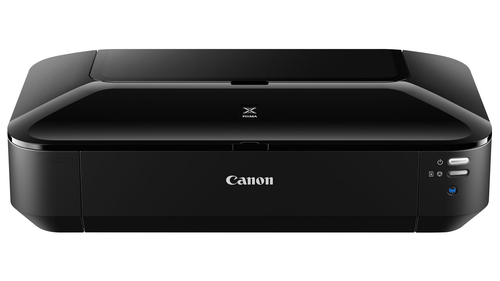
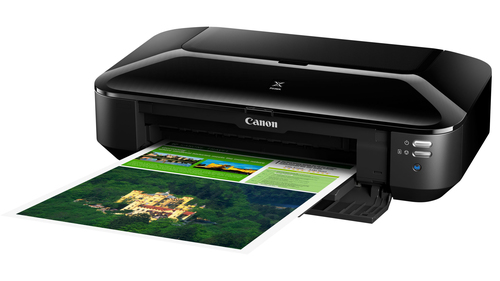
Running a small office or home studio means you need reliable, high-quality prints without endless tinkering. The Canon PIXMA iX6850 (8747B008) Inkjet 9600 x 2400 DPI Inkjet Printer delivers A3+ colour and photo output straight from your laptop or phone, so you can finish projects faster and keep clients impressed.
Benefits of Canon Inkjet Printer
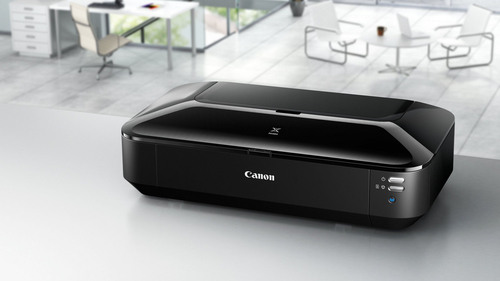
You enjoy crisp, professional-grade documents and vivid photos that last, thanks to the precise 9600 × 2400 DPI output. The separate five-ink system means you replace only the colour that runs out, lowering ongoing costs. Wireless and Ethernet options let every device on your network print without cables, simplifying workflow. Its compact A3+ design fits snugly in modest workspaces while handling large formats. Energy-efficient operation keeps power bills low and the environment happier.
Key Features of a 9600 x 2400 DPI Inkjet Printer
- Print speed: Up to 14.5 ipm B/W, 10.4 ipm colour. Fast output keeps queues short.
- Media capacity: 150-sheet input tray. Handles bulk jobs without frequent reloading.
- Media sizes: Supports A3 plus (13 × 19 in) and smaller formats. Gives flexibility for posters, flyers and standard documents.
- Ink system: 5 single inks (pigmented black, black, cyan, magenta, yellow). Reduces waste and cost per page.
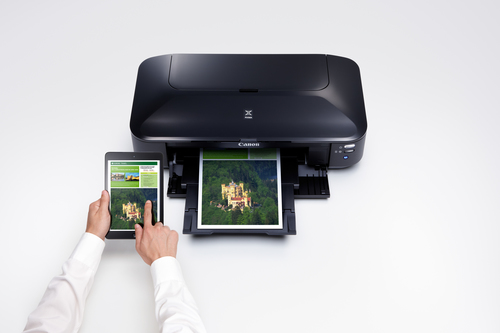
- Connectivity: Wi-Fi (n), LAN, USB 2.0. Print from computers, smartphones or tablets effortlessly.
- Print resolution: 9600 × 2400 DPI. Produces sharp text and detailed images.
- Power consumption: 24 W operational. Keeps running costs modest.
- Weight: 17.86 lbs. Sturdy yet portable enough for office moves.
- Media weight range: 64 g/m² - 300 g/m². Accepts a variety of paper types for different projects.
Usages of a 9600 x 2400 DPI Inkjet Printer
Whether you’re printing marketing material or family photos, this printer fits the bill:
- Office reports and presentations on A4 or Letter paper.
- Large-format posters and banners for trade shows.
- High-resolution photo prints on semi-gloss or matte paper.
- Custom invitations and greeting cards on cardstock.
- On-the-go printing from mobile devices during client meetings.
Why Choose a Canon Inkjet Printer
Many buyers worry that an inkjet printer capable of A3+ size will be bulky, slow or expensive to run. They also fear complex setup and limited compatibility with different devices. These concerns often lead to choosing cheaper, lower-quality models that cannot meet professional demands.
The Canon PIXMA iX6850 (8747B008) Inkjet 9600 x 2400 DPI Inkjet Printer removes those doubts. Its ultra-compact footprint houses a 150-sheet tray and supports fast 14.5 ipm monochrome speeds, so you get high-volume output without sacrificing desk space. Individual ink tanks keep running costs down, while Wi-Fi, Ethernet and USB connections ensure seamless printing from any platform, including Windows, macOS, Android and iOS. With true 9600 × 2400 DPI resolution, every document and photo looks sharp, giving you confidence that each print reflects the quality of your work.
Specifications
| Scanner |
| Scanner / Type | None |
| Miscellaneous |
| Miscellaneous / Color Category | Black |
| Miscellaneous / Consumables Included | 1 x ink tank (pigmented black) ¦ 1 x ink tank (black) ¦ 1 x ink tank (cyan) ¦ 1 x ink tank (yellow) ¦ 1 x ink tank (magenta) |
| Networking |
| Networking / Type | Print server |
| Dimensions & Weight |
| Dimensions & Weight / Height | 6.3in |
| Dimensions & Weight / Width | 23in |
| Dimensions & Weight / Depth | 12.2in |
| Dimensions & Weight / Weight | 17.86lbs |
| Printer |
| Printer / Connectivity Technology | Wired |
| Printer / Print Speed | Up to 14.5 ipm - B/W ¦ Up to 10.4 ipm - color ¦ Up to 0.6 min/page - photo - 3.95 in x 5.9 in ¦ Up to 2 min/page - photo - A3 plus (13 in x 19 in) |
| Printer / Media Sizes | A3 plus (13 in x 19 in) |
| Printer / Minimum Ink Droplet Size | 1 pl |
| Printer / Type | Photo printer |
| Printer / Total Media Capacity | 150sheets |
| Printer / Media Handling | 150-sheet input tray |
| Printer / Interface | LAN, Wi-Fi(n), USB 2.0 |
| Printer / Inkjet Technology | Canon FINE (Full-lithography inkjet Nozzle Engineering) |
| Printer / Media Type | Semi-gloss photo paper |
| Software / System Requirements |
| Software / System Requirements / OS Required | Microsoft Windows 7, Microsoft Windows Vista SP2, Microsoft Windows Vista SP1, Microsoft Windows XP SP3, Android, Apple MacOS X 10.6.8 or later, Windows 8, Apple iOS, Windows 8.1, Windows RT |
| Office Machine |
| Office Machine / Printing Output Type | Color |
| Office Machine / Type | Printer |
| Office Machine / Printing Technology | Ink-jet |
| Office Machine / Functions | Printer |
| Header |
| Header / Model | iX6850 |
| Header / Product Line | Canon PIXMA |
| Header / Packaged Quantity | 1 |
| Media Handling |
| Media Handling / Media Weight | 64 g/m² - 300 g/m² |
| Media Handling / Media Sizes | Letter A Size (8.5 in x 11 in), Legal (8.5 in x 14 in), A4 (8.25 in x 11.7 in), A5 (5.83 in x 8.25 in), B5 (6.93 in x 9.83 in), A3 (11.7 in x 16.5 in), B4 (9.83 in x 13.9 in), Ledger B Size (11 in x 17 in), 3.95 in x 5.9 in, 5.12 in x 7.1 in, 7.87 in x 9.84 in, 9.83 in x 11.8 in, A3 plus (13 in x 19 in) |
| Media Handling / Media Type | Envelopes, plain paper, photo paper, photo stickers, glossy photo paper, matte photo paper, high resolution paper, luster photo paper, semi-gloss photo paper |
| Media Handling / Max Media Size | Ledger B Size (11 in x 17 in), A3 plus (13 in x 19 in) |
| Media Handling / Media Feeders | 1 x automatic - 150 sheets - A3 plus (13 in x 19 in) weight: 64 g/m² - 300 g/m² |
| Media Handling / Total Media Capacity | 150 sheets |
| System Requirements |
| System Requirements / OS Required | Windows RT |
| General |
| General / Printer Type | Photo printer - ink-jet - color |
| Connectivity |
| Connectivity / Interface | Wi-Fi(n) |
| Expansion / Connectivity |
| Expansion / Connectivity / Connections | 1 x USB 2.0 - 4 pin USB Type B ¦ 1 x LAN - RJ-45 |
| Power Device |
| Power Device / Type | Power supply |
| Document & Media Handling |
| Document & Media Handling / Media Type Class | Photo paper |
| Document & Media Handling / Max Media Size | A3 plus (13 in x 19 in) |
| Document & Media Handling / Media Size Class | Other |
| Power |
| Power / Power Consumption Operational | 24 Watt |
| Power / Power Device | Power supply |
| Summary Details |
| Print technology | Inkjet |
| Maximum resolution | 9600 x 2400 DPI |
| Maximum print size | A3+ (330 x 483 mm) |
| Product colour | Black |