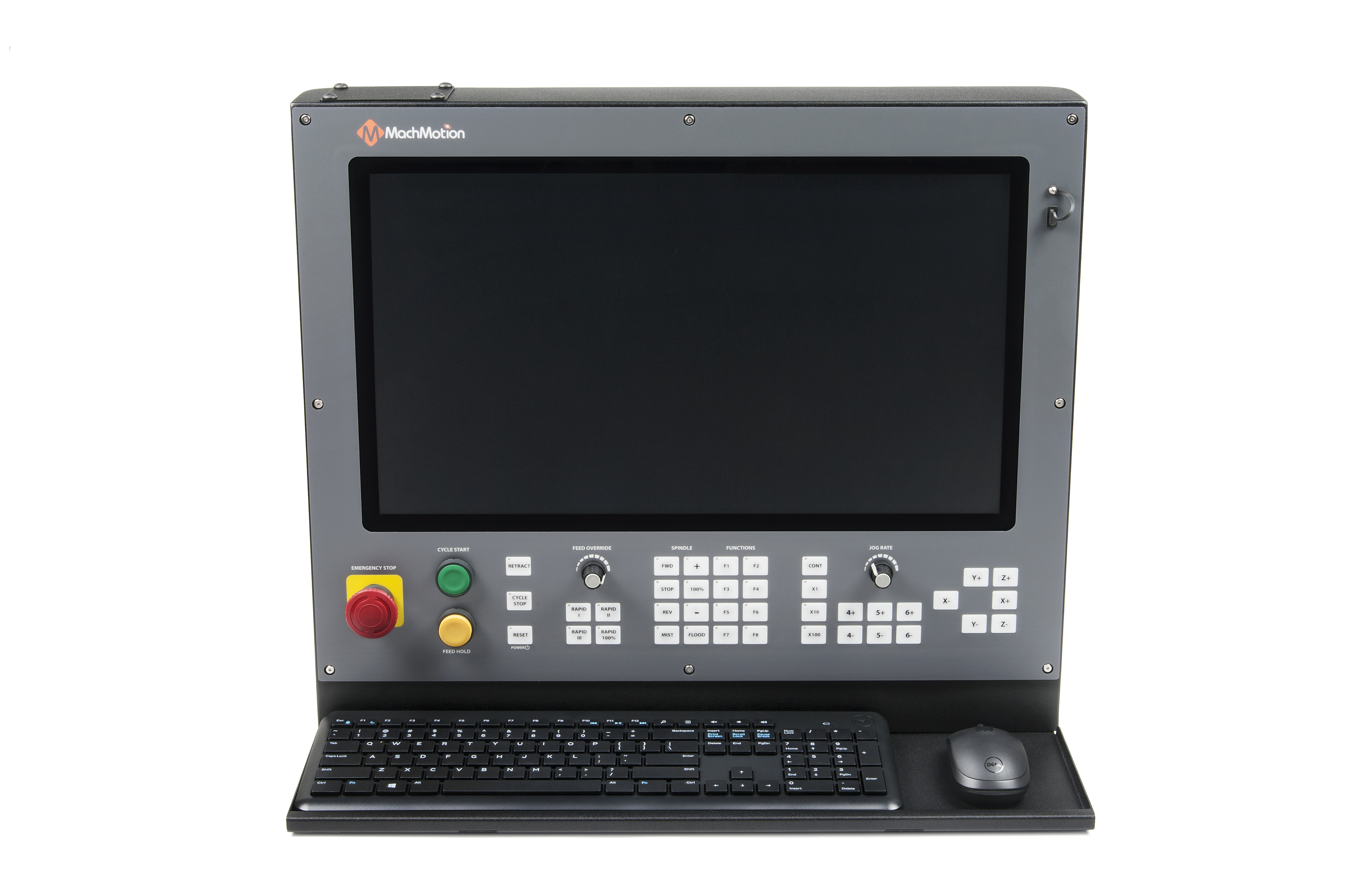
The 2000 series control is an iIndustrial PC control with an integrated 21.5" touch screen and membrane operator panel.
Connections:
| Cable |
Function |
| Blue EtherCAT Cable |
Connection to EtherCAT Network (If using EtherCAT Servo Drives) |
| Green Ethernet Cable |
Connection to Ethernet IP Network (VFD, PLC, Motion Control) |
| Blue Ethernet Cable |
Internet |
| Black Cable |
Control Power |
| 4 Conductor Cable |
E-Stop * |
Operator Panel:
1. Emergency Stop
Emergency Stop should be used in the event of an emergency and as a safety precaution any time the machine isn't running. Emergency Stop will not lose position of machine or require rehoming.
2. Cycle Control
Cycle Start can be used to start a G-Code file and is also used to start other commands such as MDI and GoTo Commands.
Feed Hold is used to pause motion during file run and will leave the spindle on. Cycle start will resume motion and continue file execution.
3. Cycle Cancels
Retract is an optional feature, currently in development and not operational. Check in with MachMotion for more information!
Cycle stop does a full cancel of the file, turns off the spindle and coolant, and puts the machine in idle.
Reset is used to clear alarms and set the machine back to default modals. These defaults can be changed in the Initialization Codes sections of the default control configuration. Reset also does a full cycle stop and rewinds the GCode file.
It is also the "Power" button. If the control is off, pressing Reset will power it on.
4. Feed Rate Overrides
The Feedrate Override knob will modify Feedrate Override percent and will affect any G01 feed rate moves. The feedrate percentage value is shown on the screen. If you are expecting motion and nothing is going, verify your feedrate is not set to 0%.
The 4 Rapid Override buttons will set the Rapid Override percent and will affect any G00 rapid rate moves. The percentages for each can be changed in the X15-[##] Operator Panel settings. You can access this from the Service section, then Maintenance tab, then Interface Config button:
5. Spindle Control
Spindle control buttons let you directly set the spindle forward, backwards, and stop. These are equivalent to calling M3, M4, and M5. You can set a default spindle speed value that will be set any time the system is initialized (reset pressed) by adding S### (where ### is the desired speed) in the Initialization Codes sections of the default control configuration.
Coolant buttons allow you to toggle the mist and flood outputs. These are equivalent to calling M7, M8, and M9
These 8 buttons can be set up for user selected features.
7. Jog Selection
CONT will put all jogging into continues mode and will continue to jog as long as you hold the jog button.
X1, X10, and X100 are incremental jogs and will move the incremental distances configured in Config -> Control
8. Jog Group
These buttons are for jogging the machine. The 4,5,6 buttons can be assigned to any auxiliary axis you have. The jog rate knob can be used to adjust the speed of the jog while jogging the machine. There is not a percentage or display of this jog rate on the screen.
Specifications:
| Item |
|
| Voltage |
DC 12V- 24V +-5% |
| Current |
3.1 Amps |
| Operating Temperature |
0°C to 40°C [32°F to 104°F] |
| Operating System |
|
| Operating System |
Windows 10 IoT Enterprise |
| Software Package |
MachMotion control software installed, powered by Mach4 software core |
| Processor |
Intel I3 (3.70 GHz) |
| Hard Drive |
120 GB solid state, mSATA |
| RAM |
8 GB |
| Wifi |
External antenna |
| Ethernet LAN (RJ45) Port |
1 (Internet / Local Network) |
| Ethernet (RJ45) Port |
1 (Machine Network for Ethernet Devices, TCP Modbus, etc.) |
| Ethernet (RJ45) Port |
1 (EtherCAT Network) |
| USB Ports |
1 (External) 2 (Internal) |
| Monitor |
21.5" Capacitive Touch Color LCD |
| Resolution |
1920 X 1080 |
| Keyboard |
Wireless - Full QWERTY with numpad |
| Mouse |
Wireless - Optical mouse with scroll wheel |
| Enclosure |
|
| Dimensions |
23.125"(W) X 20.0"(H) X 3.25"(D) |
| Material |
18 Gauge Steel, Powder Coated Skin. Machined Aluminum Face |
| Weight |
46.5 Pounds |
| Operator Interface |
|
| X15-14-2X Operator Panel |
Membrane button panel with Jog, Spindle, Coolant, Feed selections,
Emergency Stop, Cycle Start, Feed Hold, and Reset Buttons
|
| X15-41-01 Wireless Pendant (Optional) |
Wireless Handwheel |