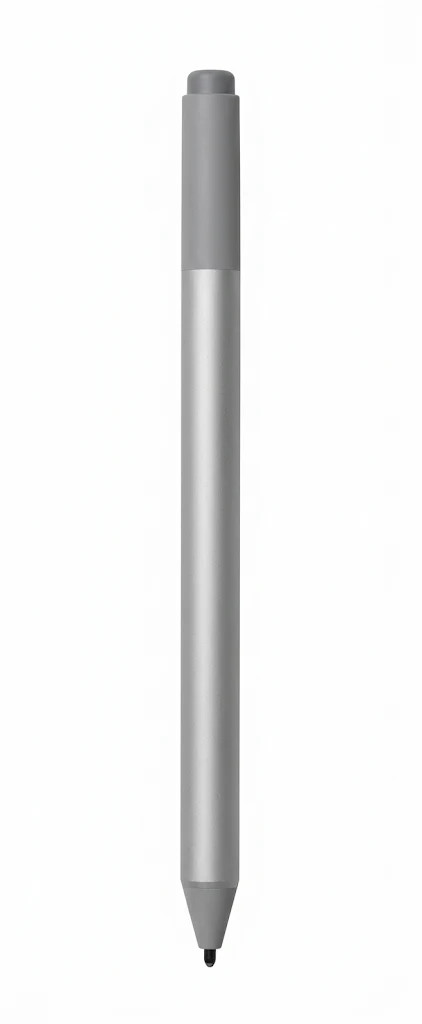
Trying to write or draw with a bare finger on a tablet often feels slow and imprecise. You want your strokes to follow your hand, not fight against it. The Surface Pen is built to give you a natural, precise writing and drawing experience on compatible Surface devices. The right pen can make digital work feel smooth and familiar, saving you time and frustration every day.
Benefits of Microsoft Surface Pens
Comfort makes a real difference when you spend hours writing or sketching, so you want a pen that keeps your hand relaxed through long sessions. You also gain peace of mind knowing it works with many Surface models, from Go and Laptop to Pro and Studio, so it can stay with you through future upgrades. Its precise response with virtually no lag keeps your work accurate, and that consistency helps your projects grow with you over time.
Key Features of This 4096 Surface Pen
- Pressure Levels: 4096. Light touches and firm strokes both register, giving you proper control.
- Connectivity Technology: Wireless. No cable gets in the way of your work.
- Product Type: Active stylus. A powered pen built to work directly with your Surface screen.
- Features: Eraser. Flip the pen over to rub out mistakes quickly.
- Weight: 20 g. Light enough to hold comfortably for long periods.
- Width: 9.7 mm. A slim body that sits neatly between your fingers.
- Depth: 9.7 mm. Matching measurements give the pen an even, compact profile.
- Included Accessories: AAAA battery. The battery is supplied, so you can start straight away.
- Color: Platinum. Choose from four colours, including Black, Burgundy and Cobalt Blue, to suit your style.
- Packaged Quantity: 1. One pen in every pack.
Everyday Uses for a 4096 Surface Pen
This pen fits into several parts of your normal day.
- Taking handwritten notes in OneNote during lectures or meetings.
- Marking up reports and documents in Microsoft Office.
- Reviewing plans in Bluebeam Revu or Drawboard.
- Sketching and shading artwork in Adobe Suite or Sketchable.
- Composing music in StaffPad or drafting 3D CAD designs.
Why Choose a Microsoft Surface Pen
Many buyers worry that a digital pen will lag behind their hand or feel too rigid for real work. Others wonder whether it will suit their Surface model or the software they already use. These doubts are fair, because a pen that drags or fails to match your device can ruin your workflow.
This Surface Pen answers those concerns with virtually no lag and 4096 levels of pressure sensitivity, so ink flows directly from the tip to your screen. It is designed for Surface Book, Go, Laptop, Pro and Studio models, and it works with apps such as OneNote, Adobe Suite and Bluebeam Revu.
Sources:
None. This description was written only from the supplied product content.
Specifications
| Compatibility Information |
| Compatibility Information / Designed For | Microsoft Surface Book, Book 2, Book 3, Book 3 for Business, Go, Go 2, Go 2 for Business, Go 3, Go 3 for Business, Go 4 for Business, Laptop, Laptop 2, Laptop 3, Laptop 3 for Business, Laptop 4, Laptop 4 for Business, Laptop 5, Laptop 5 for Business, Pro (12.3 in), Pro 3, Pro 4, Pro 6, Pro 7, Pro 7 for Business, Pro 7+, Pro 7+ for Business, Studio, Studio 2, Studio 2+ for Business |
| Miscellaneous |
| Miscellaneous / Color Category | Silver |
| Miscellaneous / Included Accessories | AAAA battery |
| Miscellaneous / Color | Platinum |
| Miscellaneous / Pricing Type | Commercial |
| Header |
| Header / Product Line | Microsoft Surface Pen |
| Header / Packaged Quantity | 1 |
| Input Device |
| Input Device / Pressure Levels | 4096 |
| Input Device / Product Type | Active stylus |
| Input Device / Connectivity Technology | Wireless |
| Input Device / Features | Eraser |
| General |
| General / Device Type | Active stylus |
| General / Color | Platinum |
| Summary Details |
| Device compatibility | Tablet |
| Brand compatibility | Microsoft |
| Product colour | Platinum |
| Weight | 20 g |
| Width | 9.7 mm |
| Depth | 9.7 mm |